
Mazda 3 Service Manual: Front Door Speaker Inspection
1. Disconnect the negative battery cable..
2. Remove the inner garnish..
3. Remove the front door trim..
4. Remove the front door speaker..
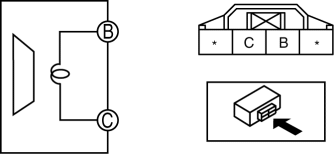
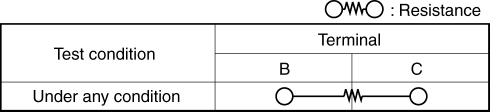
5. Verify the resistance between the front door speaker terminals.
-
If not within the specification, replace the front door speaker.
-
Resistance
-
Without Bose®: 3.4—4.6 ohms
-
With Bose®: 1.83—2.47 ohms
 Front Center Speaker Removal/Installation
1. Disconnect the negative battery cable..
2. Remove the following parts:
a. Upper column cover.
b. Instrument cluster.
c. Center panel.
d. Center cover.
e. Dashboard upper panel.
3. Rem ...
 Front Door Speaker Removal/Installation
1. Disconnect the negative battery cable..
2. Remove the inner garnish..
3. Remove the front door trim..
4. Disconnect the connector.
Without Bose®
With Bose®
5. Remove the screw. ...
Other materials:
Variable Valve Timing Actuator Removal/Installation [Mzr 2.3 Disi Turbo]
WARNING:
Fuel vapor is hazardous. It can very easily ignite, causing serious injury
and damage. Always keep sparks and flames away from fuel.
Fuel line spills and leakage are dangerous. Fuel can ignite and cause serious
injuries or death and damage. Fuel can also irritate skin ...
Driving assist systems
In the Subaru Solterra, a range of advanced driving assist systems
work seamlessly in the background to enhance safety, stability, and overall driving
performance. These systems automatically respond to changing road and driving conditions;
however, they are designed to support the driver and ...
Rear Stabilizer Removal/Installation
1. Remove in the order indicated in the table.
2. Install in the reverse order of removal.
1
Rear stabilizer control link
2
Rear stabilizer bracket
.
3
Rear stabilizer bushing
(See Rear Stabilizer, Rear Sta ...
