
Mazda 3 Service Manual: Front Wheel Hub Bolt Replacement
1. Remove the brake calliper component and disc plate..
2. Remove the wheel hub bolt using the SST
as shown in the figure.
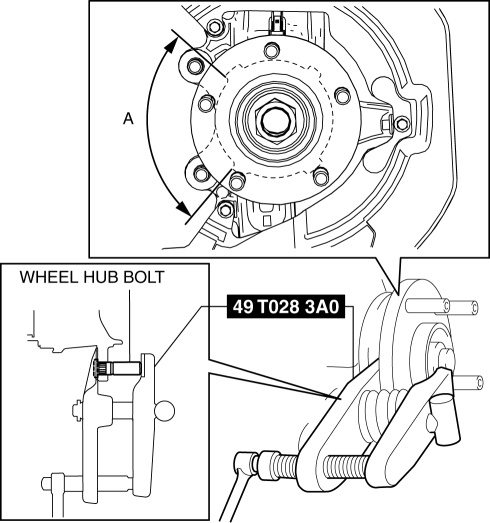
NOTE:
-
When removing the wheel hub bolts, perform the work between range A shown in the figure to assure a space for the bolt removal.
3. Place a new wheel hub bolt in the wheel hub.
4. Install the wheel hub by placing a proper sized washer on the hub, and tightening the nut as shown in the figure.
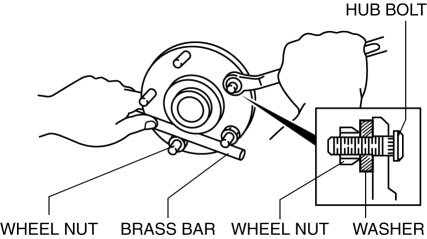
 Front Stabilizer Removal/Installation [Mzr 2.3 Disi Turbo]
1. Remove the joint cover..
2. Disconnect the steering shaft from the steering gear and linkage..
3. Remove the front crossmember component..
4. Remove in the order indicated in the table.
5. ...
 Wheel Hub, Steering Knuckle Disassembly/Assembly
1. Disassemble in the order indicated in the table.
1
Dust Cover
2
Wheel hub component
.
3
Retaining clip
...
Other materials:
Trunk Lid Stay Damper Disposal
NOTE:
The gas in the trunk lid stay damper is colorless, odorless, and non-toxic.
1. Wear protective eye wear.
2. Lay the trunk lid stay damper flat.
3. Hacksaw 2—3 mm {0.08—0.11 in} into the trunk lid stay damper
using a hacksaw, and allow the gas to escape from the trun ...
Variable Swirl Solenoid Valve Inspection [Mzr 2.3 Disi Turbo]
Airflow Inspection
1. Remove the battery cover..
2. Disconnect the negative battery cable..
3. Remove the variable swirl solenoid valve..
4. Inspect the airflow between the ports under the following conditions.
If not as specified, replace the variable swirl solenoid valve..
...
Auxiliary Jack/Usb Port Inspection
Auxiliary jack inspection
1. Disconnect the negative battery cable..
2. Remove the following parts:
a. Upper panel.
b. Shift lever knob (MTX).
c. Selector lever knob (ATX).
d. Shift panel.
e. Side wall.
f. Console.
g. Auxiliary jack/USB port.
3. Connect a commercially-available pl ...
