
Mazda 3 Service Manual: Hydraulic Variable Valve Timing Actuator Inspection [Skyactiv G 2.0]
WARNING:
-
A hot engine can cause severe burns. Turn off the engine and wait until it is cool before servicing.
CAUTION:
-
Do not disassemble the hydraulic variable valve timing actuator because it is a precision unit.
1. Remove the battery cover..
2. Disconnect the negative battery cable..
3. Remove the plug hole plate..
4. Remove the ignition coil/ion sensors..
5. Remove the cylinder head cover..
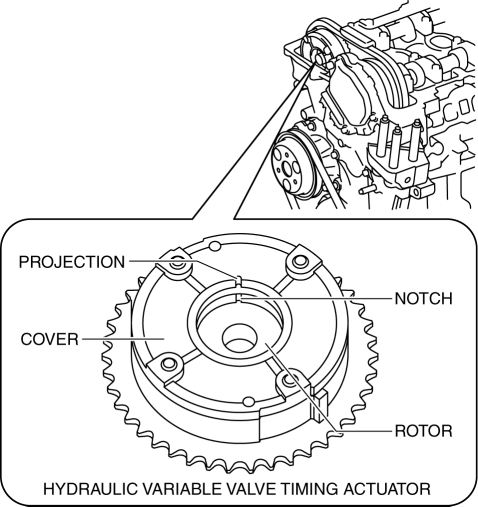
6. Verify that the notch of the rotor and projection of the cover on the hydraulic variable valve timing actuator are aligned and fitted.
-
If the notch of the rotor and projection of the cover are not aligned, rotate the crankshaft in the direction the engine rotates two turns and verify that they are aligned.
-
If the notch of the rotor and projection of the cover are still not aligned, replace the hydraulic variable valve timing actuator..
-
If, when turning the crankshaft, there is a hitting noise from the hydraulic variable valve timing actuator each time before the cam reaches its maximum lift, it means that the actuator is not secured. Replace the hydraulic variable valve timing actuator..
7. Install in the reverse order of removal.
 Variable Valve Timing Actuator Removal/Installation [Mzr 2.3 Disi Turbo]
WARNING:
Fuel vapor is hazardous. It can very easily ignite, causing serious injury
and damage. Always keep sparks and flames away from fuel.
Fuel line spills and leakage are danger ...

Other materials:
Input/Turbine Speed Sensor Removal/Installation [FS5 A EL]
CAUTION:
Always use a new bolt. If the removed input/turbine speed sensor installation
bolt is reused, it may cause oil leakage.
A sealant coating is applied to the input/turbine speed sensor installation
bolt to prevent oil leakage from the installation bolt hole which passes ...
Discharge Headlight Service Warnings
Discharge Headlight Service Warnings
To prevent electrical shock when replacing the discharge headlight bulb,
always perform the servicing with dry hands and in an area where it does not
get wet.
Never probe the discharge headlight bulb connector directly with a finger
o ...
Transaxle Fluid Temperature (Tft) Sensor Inspection [FS5 A EL]
CAUTION:
Water or foreign objects entering the connector can cause a poor connection
or corrosion. Be sure not to drop water or foreign objects on the connector
when disconnecting it.
On-Vehicle Inspection
1. Perform the following procedures.
a. Remove the battery cover..
b. ...
