
Mazda 3 Owners Manual: Laser Sensor (Front)
The Smart City Brake Support (SCBS) laser sensor is installed at the top of the windshield near the rearview mirror.
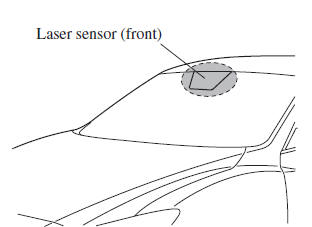
Always keep the surface of the windshield around the laser sensor clean to assure proper operation of the Smart City Brake Support (SCBS) system.
WARNING
As there is the possibility of eye damage occurring from the laser,
always heed the
following precautions:
|
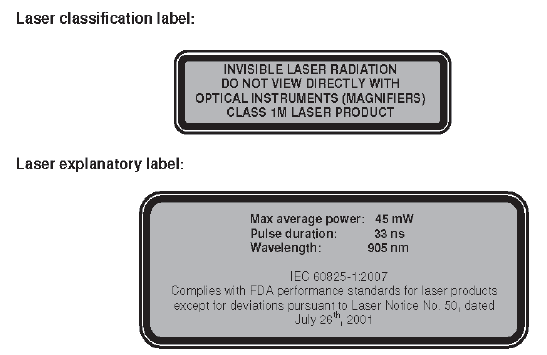
Laser sensor radiation data
Maximum average power: 45 mW
Pulse duration: 33 ns
Wavelength: 905 nm
Divergence angle (horizontal×vertical): 28 degrees×12 degrees
 Radar Sensor (Front)
Your vehicle is equipped with a radar sensor (front).
The following systems also use the radar sensor (front).
Mazda Radar Cruise Control (MRCC)
Forward Obstruction Warning (FOW)
The radar ...
 Radar Sensors (Rear)
The radar sensors (rear) for the rear vehicle monitoring system are equipped
inside the rear
bumper, one each on the left and right sides.
Sedan
Hatchback
The surface area of the rear bu ...
Other materials:
Liftgate Upper Trim Removal/Installation
1. Detach tab while pulling the liftgate upper trim in the direction of the arrow
(1) shown in the figure, then detach clips and pin while pulling in the direction
of the arrow (2).
2. Detach tab while pulling the liftgate upper trim in the direction of the arrow
(3) shown in the figure, ...
Refrigerant Pressure Sensor Removal/Installation [Manual Air Conditioner]
1. Disconnect the negative battery cable..
2. Discharge the refrigerant..
3. Disconnect the refrigerant pressure sensor connector.
CAUTION:
If moisture or foreign material enters the refrigeration cycle, cooling ability
will be lowered and abnormal noise will occur. Always immediate ...
Air Filter Removal/Installation [Mzr 2.3 Disi Turbo]
1. Remove the fuel-filler pipe protector..
2. Remove in the order indicated in the table.
1
Evaporative hose
2
Air filter
3. Install in the reverse order of removal. ...
