
Mazda 3 Owners Manual: Radar Sensor (Front)
Your vehicle is equipped with a radar sensor (front).
The following systems also use the radar sensor (front).
- Mazda Radar Cruise Control (MRCC)
- Forward Obstruction Warning (FOW)
The radar sensor (front) functions by detecting the radio waves reflected off a vehicle ahead or an obstruction sent from the radar sensor (front).
The radar sensor (front) is mounted behind the front emblem.
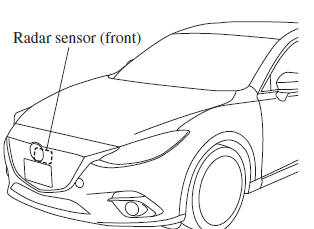
If the Forward Obstruction Warning (FOW) warning light (amber) is illuminated, the area around the radar sensor (front) may be dirty. Refer to “Warning Guidance” in the center display (Type B audio).
Refer to If a Warning Light Turns On or Flashes on .
CAUTION
Heed the following precautions to assure correct operation of each
system.
|
NOTE
- In the following cases, the radar sensor (front) may not be able to detect vehicles ahead or obstructions.
- The rear surface of a vehicle ahead does not reflect radio waves effectively, such as an unloaded trailer or an automobile with a loading platform covered by a soft top, vehicles with a hard plastic tailgate, and round-shaped vehicles.
- Vehicles ahead with low vehicle height and thus less area for reflecting radio waves.
- Visibility is reduced due to a vehicle ahead casting off water, snow, or sand from its tires and onto your windshield.
- The trunk/luggage compartment is loaded with heavy objects or the rear passenger seats are occupied.
- Ice, snow, or soiling is on the front surface of the front emblem.
- During inclement weather such as rain, snow, or sand storms.
- When driving near facilities or objects emitting strong radio waves.
- In the following cases, the radar sensor (front) may detect vehicles in the opposite lane or surrounding obstructions, or it may not be able to detect vehicles ahead or obstructions.
- The beginning and end of a curve.
- Roads with continuous curves.
- Narrow lane roads due to road construction or lane closures.
- The vehicle ahead enters the radar sensor's blind spot.
- The vehicle ahead is running abnormally due to accident or vehicle damage.
- Roads with repeated up and down slopes
- Driving on poor roads or unpaved roads.
- The distance between your vehicle and the vehicle ahead is extremely short.
- A vehicle suddenly comes close such as by cutting into the lane.
- To prevent incorrect operation of the system, use tires of the same specified size, manufacturer, brand, and tread pattern on all four wheels. In addition, do not use tires with significantly different wear patterns or tire pressures on the same vehicle. (Including the temporary spare tire)
- If the battery power is weak, the system may not operate correctly.
- When driving on roads with little traffic and few vehicles ahead or obstructions for the radar sensor (front) to detect, Forward Obstruction Warning/Smart City Brake Support (FOW/SCBS) warning light (amber) temporarily illuminates, however, this does not indicate a problem.
 Forward Sensing Camera
(FSC)
Forward Sensing Camera
(FSC)
Your vehicle is equipped with a Forward Sensing Camera (FSC). The Forward
Sensing
Camera (FSC) is positioned near the rearview mirror and used by the following
systems.
High Beam Control Syst ...
 Laser Sensor (Front)
The Smart City Brake Support (SCBS) laser sensor is installed at the top of
the windshield
near the rearview mirror.
Always keep the surface of the windshield around the laser sensor clean to ...
Other materials:
Rear Door Module Panel Removal/Installation
1. Fully open the rear door glass.
2. Disconnect the negative battery cable..
3. Remove the following parts:
a. Rear door trim.
b. Rear door speaker.
c. Rear power window motor.
d. Rear door quarter glass.
e. Rear door glass.
4. Remove the clips securing the rear door wiring harness ...
Antenna Feeder No.1 Inspection
1. Disconnect the negative battery cable..
2. Remove the following parts:
a. Center panel.
b. Audio unit.
c. A-pillar trim (RH).
3. Disconnect antenna feeder No.2.
4. Verify that the continuity between antenna feeder No.1 terminals is as indicated
in the table.
If not a ...
Tire Rotation
WARNING
Rotate tires periodically:
Irregular tire wear is dangerous. To
equalize tread wear for maintaining
good performance in handling and
braking, rotate the tires every 12,000
km (7,500 miles). However Mazda
recommends to rotate every 8,000 km
(5,000 miles) to help ...
