
Mazda 3 Service Manual: Neutral Switch Removal/Installation [C66 M R]
1. Remove the battery cover..
2. Disconnect the negative battery cable..
3. Remove the aerodynamic under cover No.2..
4. Install in the reverse order of removal.
5. Remove in the order indicated in the table.
6. Install in the reverse order of removal.
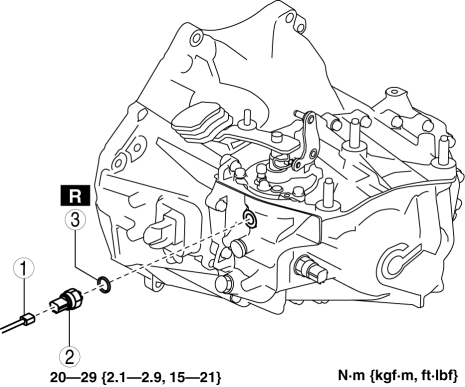
|
1 |
Neutral switch connector |
|
2 |
Neutral switch |
|
3 |
Gasket |
 Neutral Switch Removal/Installation [A26 M R]
1. Disconnect the negative battery cable.
2. Disconnect the neutral switch connector.
3. Remove the aerodynamic under cover No.2..
4. Remove the neutral switch with the gasket.
5. Install ...
 Neutral Switch Removal/Installation [G35 M R]
1. Remove the battery cover..
2. Disconnect the negative battery cable.
3. Remove the battery component. (ex: battery, battery tray and PCM component)(See
BATTERY REMOVAL/INSTALLATION [MZR 2.0, ...
Other materials:
Canister Vent (Cv) Solenoid Valve Inspection [Mzr 2.0, Mzr 2.5]
Except for Mexico
Airflow inspection
1. Remove the battery cover..
2. Disconnect the negative battery cable..
3. Remove the CV solenoid valve..
4. Inspect airflow between the ports under the following conditions.
Measured condition
Continuity between A ...
Gauges and meters
In the Subaru Solterra, the gauges and meters are designed to provide
the driver with clear, real-time driving information, helping to maintain awareness
of vehicle performance, battery condition, and overall system status during every
journey.
Meter display
■ Locations of gauges and meter ...
Starter Cut Relay Removal/Installation [MTX]
Advanced Keyless Entry And Push Button Start System Only
1. Disconnect the negative battery cable..
2. Remove the following parts:
Front scuff plate (LH).
Front side trim (LH).
Side wall.
Console.
3. Set the hood release lever out of the way..
4. Remove the ...
