
Mazda 3 Service Manual: Oil Control Valve (OCV) Inspection [Mzr 2.0, Mzr 2.5]
Coil Resistance Inspection
1. Remove the battery cover..
2. Disconnect the negative battery cable..
3. Remove the plug hole plate..
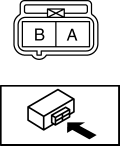
4. Disconnect the OCV connector.
5. Measure the resistance between terminals A and B using an ohmmeter.
-
OCV coil resistance
-
6.9—7.9 ohms [20°C {68°F}]
-
If not as specified, replace the OCV..
6. Install in the reverse order of removal.
Spool Valve Operation Inspection
1. Remove the OCV..
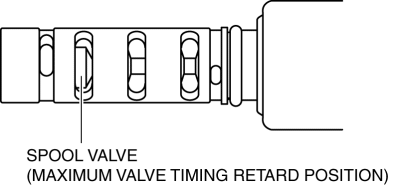
2. Verify that the spool valve in the OCV is in the maximum valve timing retard position as indicated in the figure.
-
If not as specified, replace the OCV..
3. Verify that the battery is fully charged..
-
If not as specified, recharge the battery..
NOTE:
-
When applying battery positive voltage between the OCV terminals, the connection can be either of the following:
-
Positive battery cable to terminal A, negative battery cable to terminal B
-
Positive battery cable to terminal B, negative battery cable to terminal A
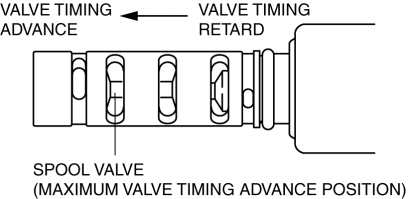
4. Apply battery positive voltage between the OCV terminals and verify that the spool valve operates and moves to the maximum valve timing advance position.
-
If not as specified, replace the OCV..
5. Stop applying battery positive voltage and verify that the spool valve returns to the maximum valve timing retard position.
-
If not as specified, replace the OCV..
6. Install the OCV..
 Front Oil Seal Replacement [Mzr 2.0, Mzr 2.5]
1. Remove the battery cover..
2. Disconnect the negative battery cable..
3. Remove the plug hole plate..
4. Disconnect the wiring harness.
5. Remove the ignition coils..
6. Remove the spark ...
 Oil Control Valve (OCV) Removal/Installation [Mzr 2.0, Mzr 2.5]
1. Remove the battery cover..
2. Disconnect the negative battery cable..
3. Remove the plug hole plate..
4. Disconnect the wiring harness.
5. Remove the ignition coils..
6. Remove the ventil ...
Other materials:
Neutral Switch Removal/Installation [A26 M R]
1. Disconnect the negative battery cable.
2. Disconnect the neutral switch connector.
3. Remove the aerodynamic under cover No.2..
4. Remove the neutral switch with the gasket.
5. Install a new gasket and the neutral switch to the transaxle case.
Tightening torque
29—39 N·m ...
Outer Mirror Glass Installation
1. Connect the mirror heater connectors. (Vehicles with heated outer mirrors)
2. Connect the BSM indicator light connector. (Vehicles with BSM system)
3. Press part C on the outer mirror glass and install pin C.
4. Press part A on the outer mirror glass and install pins A.
5. Press part ...
Rear Washer Nozzle Removal/Installation
1. Disconnect the negative battery cable..
2. Remove the following parts:
a. Liftgate upper trim.
b. Rear spoiler.
c. High-mount brake light.
3. Disconnect the rear washer hose.
4. Press the tabs and remove the rear washer nozzle.
5. Install in the reverse order of removal.
6. Ad ...
