
Mazda 3 Service Manual: Oil Cooler Flushing [FS5 A EL]
NOTE:
-
If the automatic transaxle is replaced, flush and inspect the oil cooler.
-
When replacing the automatic transaxle, inspect the oil cooler together with flushing it using the following procedures, and with the oil cooler hose removed.
1. Disconnect the oil hose.
2. Set a clean oil pan up to the oil hose inlet.
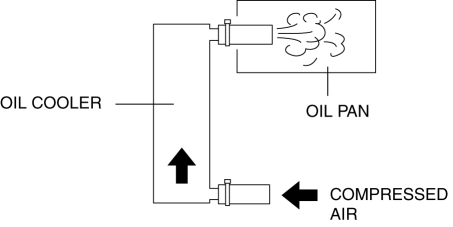
3. Blow 491—882 kPa {5—9 kgf/cm2, 72—127 psi} of compressed air into the oil hose outlet to drain remaining oil.
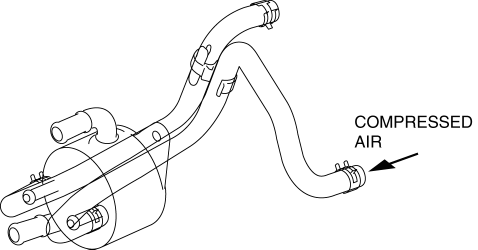
4. Add new ATF from the oil cooler hose outlet and blow 491—882 kPa {5—9 kgf/cm2, 72—127 psi} of compressed air to flush. (Repeat 2 or 3 times)
5. Verify that none of the following foreign material is mixed in with the drained ATF:
-
Large metal fragments of φ 0.5 mm {0.02 mm} or more that cannot pass through the oil strainer
-
Fibrous clutch facing
6. Repeat the procedures from Step 4 and flush the inside of the oil cooler.
-
If foreign material such as metal fragments or clutch facing remains even after the oil cooler is flushed repeatedly, replace the oil cooler.
 Oil Control Valve (OCV) Removal/Installation [Mzr 2.0, Mzr 2.5]
1. Remove the battery cover..
2. Disconnect the negative battery cable..
3. Remove the plug hole plate..
4. Disconnect the wiring harness.
5. Remove the ignition coils..
6. Remove the ventil ...
 Oil Cooler Removal/Installation [FS5 A EL]
1. Remove the battery cover..
2. Disconnect the negative battery cable.
3. Remove the air cleaner component..
4. Remove the aerodynamic under cover NO.2..
5. Drain the ATF..
6. Drain the eng ...
Other materials:
Automatic Transaxle Removal/Installation [FS5 A EL]
CAUTION:
Secure the steering wheel using tape or a cable to prevent the steering shaft
from rotating after disconnecting the steering shaft. If the steering wheel
rotates after the steering shaft and the steering gear and linkage are disconnected,
the internal parts of the clock spr ...
Auxiliary Jack Inspection
1. Disconnect the negative battery cable..
2. Remove the following parts:
a. Upper panel.
b. Shift lever knob (MTX).
c. Selector lever knob (ATX).
d. Shift panel.
e. Side wall.
f. Console.
g. Auxiliary jack.
3. Connect a commercially-available nonresistant plug to the auxiliary jac ...
Maintenance requirements
For the Subaru Solterra, consistent daily care and properly scheduled
maintenance are ключовими факторами для забезпечення
безпечної, ефективної та економічної експлуатації.
Власник автомобіля несÐ ...
