
Mazda 3 Service Manual: On Board Diagnostic System Simulation Inspection [FS5 A EL]
1. Connect the M-MDS(IDS) to the DLC-2.
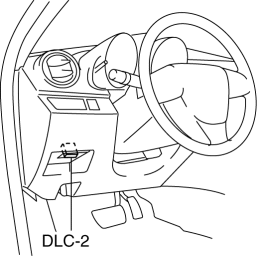
2. After the vehicle is identified, select the following items from the initialization screen of the IDS.
a. Select "DataLogger".
b. Select "Modules".
c. Select "TCM".
3. Select the simulation items from the PID table.
4. Perform the active command modes function, inspect the operations for each parts.
-
If the operation of output parts cannot be verified after the active command mode inspection is performed, this could indicate the possibility of an open or short circuit, sticking, or operation malfunction in the output parts.
|
Item |
Related to |
Unit/Condition |
Test condition |
|
LPS |
Pressure control solenoid A |
A |
Idling at P or N position |
|
LPSB |
Pressure control solenoid B |
% |
Idling at P or N position |
|
SSA/SS1 |
Shift solenoid A |
% |
Idling at P or N position |
|
SSB/SS2 |
Shift solenoid B |
% |
Idling at P or N position |
|
SSC/SS3 |
Shift solenoid C |
% |
Idling at P or N position |
|
SSD/SS4 |
Shift solenoid D |
On/Off |
Idling at P or N position |
|
SSE_SS5 |
Shift solenoid E |
On/Off |
Idling at P or N position |
|
SSF_SS6 |
Shift solenoid F |
On/Off |
Idling at P or N position |
 On Board Diagnostic System PID/Data Monitor Inspection [Fw6 A EL]
1. Connect the M-MDS (IDS) to the DLC-2.
2. After the vehicle is identified, select the following items from the initialization
screen of the IDS.
a. Select “DataLogger”.
b. Select “ ...
 On Board Diagnostic System Simulation Inspection [Fw6 A EL]
1. Connect the M-MDS (IDS) to the DLC-2.
2. After the vehicle is identified, select the following items from the initialization
screen of the IDS.
a. Select “DataLogger”.
b. Select “ ...
Other materials:
Scheduled Maintenance (U.S.A., Canada, and Puerto Rico)
Follow Schedule 1 if the vehicle is operated mainly where none of the
following conditions
(severe driving conditions)apply.
Repeated short-distance driving
Driving in dusty conditions
Driving with extended use of brakes
Driving in areas where salt or other corrosive materials are used
...
Cruise control
In the Subaru Solterra, cruise control allows the vehicle to maintain
a constant speed without continuous pressure on the accelerator pedal, providing
a more relaxed and efficient driving experience on long journeys.
The Subaru Solterra cruise control system is intended for use on
highways an ...
Gracenote Database (Type B)
When a USB device is connected to this unit and the audio is played, the
album name,
artist name, genre and title information are automatically displayed if there is
a match in
the vehicle's database compilation to the music being played. The information
stored in this
device uses database ...
