
Mazda 3 Service Manual: Parking Light Bulb Removal/Installation
1. Disconnect the negative battery cable..
2. Rotate the parking light socket in the direction of the arrow shown in the figure to remove it.
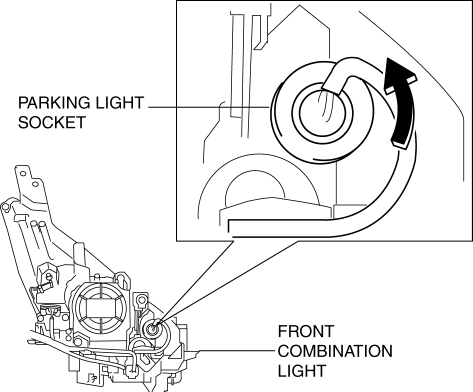
3. Remove the parking light bulb.
4. Install in the reverse order of removal.
 PID/Data Monitor Inspection [Afs (Adaptive Front Lighting System)]
1. Connect the M-MDS (IDS) to the DLC-2.
2. After the vehicle is identified, select the following items from the initialization
screen of the IDS.
a. Select “DataLogger”.
b. Select “ ...
 Parking/Front Side Marker/Front Turn Light Bulb Removal/Installation
1. Disconnect the negative battery cable..
2. Slightly bend back the front mudguard..
3. Rotate the parking/front side marker/front turn light socket in the direction
of the arrow shown in the f ...
Other materials:
Call Interrupt
A call can be interrupted to receive an
incoming call from a third party.
When is selected or the pickup
button on the steering wheel is pressed,
the current call is held and the system
switches to the new incoming call.
When is selected, the current
call is ended and the system switche ...
Starting a Flooded Engine
If the engine fails to start, it may be
flooded (excessive fuel in the engine).
Follow this procedure:
If the engine does not start within
five seconds on the first try, wait ten
seconds and try again.
Make sure the parking brake is on.
Depress the accelerator all the way and
hold ...
Trunk Lid Opener Lever Removal/Installation
1. Remove the front scuff plate (LH)..
2. Remove the front side trim (LH)..
3. Remove the fuel-filler lid opener bezel..
4. Partially peel back the floor covering.
5. Remove the bolts.
6. Disconnect the cable and trunk lid opener lever.
7. Install in the reverse order of removal. ...
