
Mazda 3 Service Manual: Pilot Bearing Inspection [G35 M R]
1. Perform the following procedures.
a. Remove the battery cover..
b. Disconnect the negative battery cable.
c. Remove the battery component. (ex: battery, battery tray and PCM component).
d. Remove the air cleaner component..
e. Remove the exhaust manifold insulator installation bolts and set the exhaust manifold insulator aside.
f. Remove the exhaust manifold bracket..
g. Remove the front splash shield..
h. Remove the aerodynamic under cover No.2..
i. Remove the starter..
j. Drain the transaxle oil into a suitable container..
k. Remove the manual transaxle..
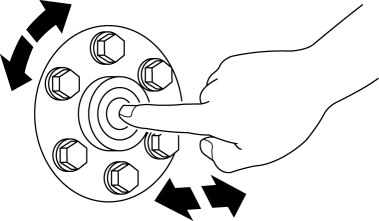
2. Without removing the pilot bearing, turn the bearing while applying force in the axial direction.
-
If there is any malfunction, replace the pilot bearing..
 Pilot Bearing Inspection [C66 M R]
1. Without removing the pilot bearing, turn the bearing while applying force
in the axial direction.
If there is any malfunction, replace the pilot bearing..
...
 Pilot Bearing Inspection [G66 M R]
1. Perform the following procedures.
a. Remove the battery cover..
b. Disconnect the negative battery cable.
c. Remove the battery component. (ex: battery, battery tray and PCM component).
d. ...
Other materials:
Advanced Park guidance screens
The Subaru Solterra Advanced Park system provides clear and intuitive guidance
screens on the multimedia display, helping the driver easily understand vehicle
positioning and parking operations in real time.
Guidance screen (When assistance starts)
Target parking space box (blue)
Ad ...
Antenna Feeder No.7 Removal/Installation
1. Disconnect the negative battery cable..
2. Remove the liftgate upper trim..
3. Disconnect the connector A.
4. Disconnect the connector B..
5. Remove the bolt.
6. Remove the antenna feeder No.7.
7. Install in the reverse order of removal.
Connector B Removal Note
1. Remove the c ...
Air Filter Removal/Installation [Mzr 2.0, Mzr 2.5]
Except for Mexico
1. Remove the fuel-filler pipe protector..
2. Remove in the order indicated in the table.
1
Evaporative hose
2
Air filter
3. Install in the reverse order of removal. ...
