
Mazda 3 Service Manual: Pilot Bearing Inspection [G66 M R]
1. Perform the following procedures.
a. Remove the battery cover..
b. Disconnect the negative battery cable.
c. Remove the battery component. (ex: battery, battery tray and PCM component).
d. Remove the air cleaner component..
e. Remove the exhaust manifold insulator installation bolts and set the exhaust manifold insulator aside.
f. Remove the exhaust manifold bracket..
g. Remove the front splash shield..
h. Remove the aerodynamic under cover No.2..
i. Remove the starter..
j. Drain the transaxle oil into a suitable container..
k. Remove the manual transaxle..
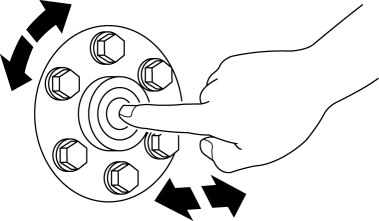
2. Without removing the pilot bearing, turn the bearing while applying force in the axial direction.
-
If there is any malfunction, replace the pilot bearing..
 Pilot Bearing Inspection [G35 M R]
1. Perform the following procedures.
a. Remove the battery cover..
b. Disconnect the negative battery cable.
c. Remove the battery component. (ex: battery, battery tray and PCM component).
d. ...
 Selector Lever Inspection
1. Switch the ignition to ON.
2. Perform the following procedures to inspect the selector lever.
If there is any malfunction, adjust the selector cable..
a. Verify that the selector le ...
Other materials:
Non Return Valve Inspection [Mzr 2.0, Mzr 2.5]
WARNING:
Fuel is very flammable liquid. If fuel spills or leaks from the pressurized
fuel system, it will cause serious injury or death and facility breakage. Fuel
can also irritate skin and eyes. To prevent this, always complete the “Fuel
Line Safety Procedure”, while referring ...
Camshaft Position (CMP) Sensor Inspection [Mzr 2.0, Mzr 2.5]
Visual Inspection
CAUTION:
When replacing the CMP sensor, make sure there is no foreign material on
it such as metal shavings. If it is installed with foreign material, the sensor
output signal will malfunction resulting from fluctuation in magnetic flux and
cause a deterioration i ...
Smart City Brake Support
(SCBS)
The Smart City Brake Support (SCBS) system is designed to reduce damage in
the event
of a collision by operating the brake control (SCBS brake) when the system's
laser sensor
(front) detects a vehicle ahead and determines that a collision with a vehicle
ahead is
unavoidable. It may also be ...
