
Subaru Solterra 2023-2026 Owner's Manual: PKSB (Parking Support Brake)
The Subaru Solterra PKSB (Parking Support Brake) system is engineered to assist the driver during low-speed maneuvers, such as parking, by issuing warnings and automatically applying braking force to help reduce potential collision damage with detected obstacles.
PKSB (Parking Support Brake) system
The Subaru Solterra identifies various types of objects as potential operation targets depending on the active function and driving conditions.
(Detection targets may vary depending on system mode and equipment configuration.)
- Parking Support Brake function (stationary objects in front and rear of the Subaru Solterra)
- Parking Support Brake function (moving vehicles behind the Subaru Solterra)
- Parking Support Brake function (pedestrians detected behind the Subaru Solterra)
- Parking Support Brake function (objects surrounding the vehicle for models equipped with Advanced Park)
WARNING
■ Cautions regarding the use of the system
The Subaru Solterra PKSB system should never be relied upon as a substitute for attentive driving, as misuse or overconfidence may result in accidents.
Always operate the Subaru Solterra with full awareness of the surrounding environment.
System performance may vary depending on vehicle conditions, road surface, weather, and external factors.
The capabilities of sensors and radar systems installed in the Subaru Solterra are limited and may not detect all objects.
Even with advanced assistance systems, the driver must continuously monitor surroundings and remain in full control of the Subaru Solterra.
- The driver is entirely responsible for safe vehicle operation. The Subaru
Solterra Parking Support Brake system is designed only to assist and help minimize
the severity of potential impacts.
However, the system may not activate in all situations or may respond differently depending on conditions.
- The Subaru Solterra PKSB system is not intended to bring the vehicle to a complete stop in every case. Even if automatic braking occurs, the driver must immediately apply the brake pedal, as system braking assistance is canceled after approximately 2 seconds.
- Testing the system by intentionally driving toward obstacles such as
walls or barriers is extremely dangerous.
Such actions must never be attempted under any circumstances.
■ When to disable the Parking Support Brake
In certain situations, it is recommended to deactivate the Subaru Solterra PKSB system, as it may respond unnecessarily even when no collision risk exists.
- When performing vehicle inspections using equipment such as chassis rollers, dynamometers, or free rollers
- When transporting the Subaru Solterra via truck, ship, or other carriers
- If the suspension has been modified or non-standard tire sizes are installed
- When the vehicle height is altered due to heavy or uneven cargo loading
- When accessories are installed near sensors, such as towing hooks, transport hooks, bumper trims, bicycle carriers, or snow removal attachments
- When using automatic car wash systems
- If the Subaru Solterra cannot maintain stable driving conditions due to damage or malfunction
- When driving aggressively or in off-road environments
- When tire pressure is incorrect or below recommended levels
- When tires are excessively worn
- When using tire chains, compact spare tires, or emergency puncture repair kits
- When towing with the Subaru Solterra
The Subaru Solterra PKSB system enhances low-speed safety by supporting braking operations during parking scenarios, but it should always be combined with careful observation and responsible driving behavior for optimal safety performance.
WARNING
■ Precautions for the suspension
Avoid making any modifications to the suspension system of the Subaru Solterra. Alterations that change the vehicle height, balance, or tilt can negatively affect sensor alignment, which may prevent the system from accurately detecting obstacles and could result in improper operation or increased risk of an accident.
Enabling/Disabling the Parking Support Brake
The Subaru Solterra Parking Support Brake (PKSB) feature can be activated or deactivated via the vehicle’s customization settings menu.
When the Subaru Solterra PKSB is switched off, the driving assist information indicator (P.150) will illuminate, and a corresponding message will appear on the multi-information display.
If the system is manually turned OFF, the Subaru Solterra Parking Support Brake will remain disabled until it is reactivated through the settings menu.
(The system will not automatically re-enable, even if the Subaru Solterra is restarted after being powered off.)
Display and buzzer for EV system output restriction control and brake control
When the Subaru Solterra detects a potential hazard and activates output restriction or braking assistance, both audible and visual alerts are provided to notify the driver.
Depending on the detected risk level, the system may limit acceleration or apply braking force to prevent or mitigate a collision.
- EV system output restriction control is operating (acceleration restriction)
In this state, the Subaru Solterra limits acceleration beyond a certain threshold to maintain safety.
Multimedia display: No warning shown
Multi-information display: "Object Detected Acceleration Reduced"
Driving assist information indicator: Not illuminated
Buzzer: Silent
- EV system output restriction control is operating (maximum output limitation)
The Subaru Solterra system determines that stronger braking assistance may be required and reduces power output accordingly.
Multimedia display (vehicles equipped with panoramic view monitor or parking assist monitor with RCD [Rear Camera Detection]): "BRAKE!"
Multi-information display: "BRAKE!"
Driving assist information indicator: Not illuminated
Buzzer: Short alert tone
- Brake control is operating
The system identifies an immediate risk and activates automatic braking to help avoid or reduce collision impact.
Multimedia display (vehicles equipped with panoramic view monitor or parking assist monitor with RCD [Rear Camera Detection]): "BRAKE!"
Multi-information display: "BRAKE!"
Driving assist information indicator: Not illuminated
Buzzer: Short alert tone
- Vehicle stopped by system operation
The Subaru Solterra has come to a stop due to automatic braking intervention.
Multimedia display (vehicles equipped with panoramic view monitor or parking assist monitor with RCD [Rear Camera Detection]): "Press Brake Pedal"
Multi-information display: "Accelerator Pedal is Pressed Press Brake Pedal"
If the accelerator pedal is not being pressed, the message "Press Brake Pedal" will be shown.
Driving assist information indicator: Illuminated
Buzzer: Repeated warning sound
System overview
When the Subaru Solterra Parking Support Brake system determines that a collision with an object or pedestrian is possible, it automatically limits EV system output to reduce acceleration and help prevent an increase in vehicle speed.
This intelligent control strategy in the Subaru Solterra enhances safety during low-speed maneuvers by combining power limitation with braking assistance, ensuring that the driver has additional support when navigating tight or complex parking environments.
(EV system output restriction control: Refer to figure 2 below.) In addition, if the accelerator pedal continues to be pressed, the Subaru Solterra will automatically apply braking force to help reduce vehicle speed and avoid a potential collision. (Brake control: Refer to figure 3.)
- Figure 1: Condition when the Subaru Solterra PKSB (Parking Support Brake) is not active
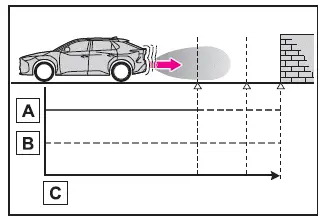
- EV system output
- Braking force
- Time
- Figure 2: Condition when Subaru Solterra EV system output restriction control is activated
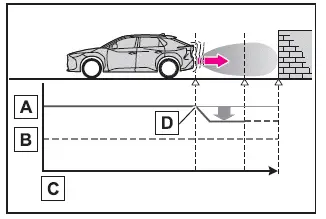
- EV system output
- Braking force
- Time
- EV system output restriction begins (system detects a high likelihood of collision with an object)
- Figure 3: Condition when both EV system output restriction and brake control are activated in the Subaru Solterra
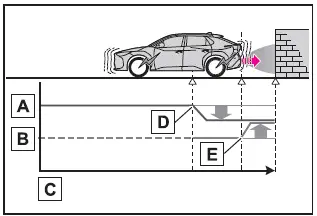
- EV system output
- Braking force
- Time
- EV output restriction begins (collision risk detected)
- Brake control activates (system determines extremely high collision probability)
■ If the Parking Support Brake has operated
If the Subaru Solterra comes to a stop due to PKSB intervention, the Parking Support Brake system will temporarily deactivate and the driving assist information indicator will illuminate to inform the driver.
Even when the Subaru Solterra PKSB engages, automatic braking control is released after approximately 2 seconds to allow the vehicle to move again if necessary.
The driver can also cancel brake control at any time by pressing the brake pedal. After that, pressing the accelerator pedal will allow the Subaru Solterra to move forward again.
■ Re-enabling the Parking Support Brake
To restore the Subaru Solterra Parking Support Brake after it has been disabled due to system activation, either manually turn the system back on via settings or cycle the power switch OFF and then ON.
Additionally, the Subaru Solterra PKSB system may automatically reactivate and the warning indicator will turn off if any of the following conditions are met:
- The gear selector is shifted to P
- The Subaru Solterra moves forward with no detected obstacles in its path
- The driving direction of the vehicle is changed
■ Buzzer
Regardless of whether SUBARU Parking Assist is enabled, as long as the Subaru Solterra PKSB system is active, an audible buzzer will notify the driver of the approximate distance to detected objects whenever EV output restriction or brake control is engaged.
The Subaru Solterra intelligently combines power limitation and automatic braking to provide enhanced protection during low-speed maneuvers, but the driver should always remain attentive and prepared to intervene immediately when necessary.
 RCD (Rear Camera Detection)
When reversing the Subaru Solterra, the rear camera detection system
actively monitors the area behind the vehicle and is capable of identifying pedestrians
within its coverage zone.
If a pedestr ...
 Parking Support Brake function (static objects front and rear of the vehicle/static
objects around the vehicle)
Parking Support Brake function (static objects front and rear of the vehicle/static
objects around the vehicle)
Within the Subaru Solterra, the Parking Support Brake system continuously
monitors the driving path for stationary obstacles such as walls or fixed structures.
If the sensors detect a static objec ...
Other materials:
Rear Door Checker Removal/Installation
1. Fully close the rear door glass.
2. Disconnect the negative battery cable..
3. Remove the rear door trim..
4. Remove the rear door speaker..
5. Remove the bolt A.
6. Remove the bolts B.
7. Pull out the rear door checker from the rear door speaker installation hole.
8. Insta ...
Air Bleeding
CAUTION:
If the strainer is removed, impurities may penetrate the power steering system
and damage it. To prevent this, always bleed air with the strainer installed.
Do not maintain the steering wheel fully turned for 5 s or more. The oil
temperature could rise and damage ...
Battery Inspection [Skyactiv G 2.0]
WARNING:
Since battery acid is toxic, be careful when handling the battery.
Since battery acid is highly corrosive, be careful not to allow it to contact
clothing or the vehicle.
In case battery acid contacts skin, eyes, or clothing, flush it immediately
with running wa ...
