
Mazda 3 Service Manual: Rear Center Speaker Removal/Installation
1. Disconnect the negative battery cable..
2. Remove the following parts:
a. Rear seat cushion.
b. Rear scuff plate.
c. Tire house trim.
d. C-pillar trim.
e. Rear package trim.
3. Remove the screw.
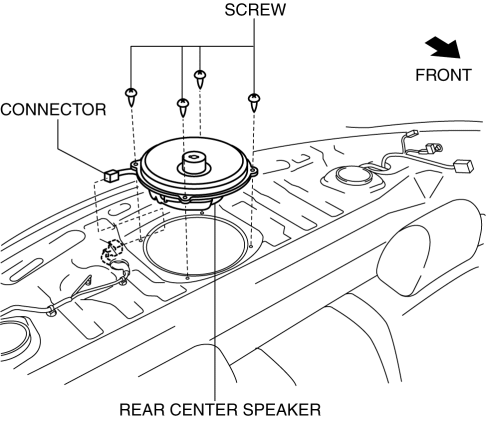
4. Disconnect the connector.
5. Remove the rear center speaker.
6. Install in the reverse order of removal.
 Rear Center Speaker Inspection
1. Disconnect the negative battery cable..
2. Remove the following parts:
a. Rear seat cushion.
b. Rear scuff plate.
c. Tire house trim.
d. C-pillar trim.
e. Rear package trim.
f. Rear c ...
 Rear Door Speaker Inspection
1. Disconnect the negative battery cable..
2. Remove the rear door trim..
3. Remove the rear door speaker..
4. Verify the resistance between the rear door speaker terminals.
If not w ...
Other materials:
Engine Tune Up [Mzr 2.3 Disi Turbo]
NOTE:
If the accelerator pedal is depressed continuously for a specified time,
the engine speed may decrease to the idle speed. This is due to the fuel cut
control operation, which prevents overheating, and it does not indicate a malfunction.
Engine Tune-up Preparation
1. Verify ...
Warning Lights
These lights turn on or flash to notify the user of the system operation
status or a system
malfunction.
Signal
Warning Lights
Master Warning Light *1
Brake System Warning Light *1*2
ABS Warning Light *1
Charging System Warnin ...
Locking, Unlocking with Key
All doors and the liftgate lock
automatically when the driver's door is
locked using the auxiliary key.
All doors and the liftgate unlock when the
driver's door is unlocked and the auxiliary
key is held in the unlock position for one
second or longer.
Turn the auxiliary key toward the fro ...
