
Mazda 3 Service Manual: Rear Center Speaker Inspection
1. Disconnect the negative battery cable..
2. Remove the following parts:
a. Rear seat cushion.
b. Rear scuff plate.
c. Tire house trim.
d. C-pillar trim.
e. Rear package trim.
f. Rear center speaker.
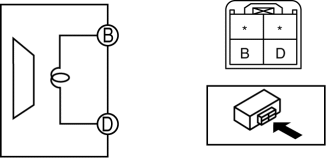
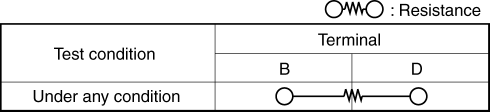
3. Verify the resistance between the rear center speaker terminals.
-
If not within the specification, replace the rear center speaker.
-
Resistance
-
0.9—1.1 ohms
 Keyless Antenna Removal/Installation
Interior, Front
1. Disconnect the negative battery cable..
2. Remove the following parts:
a. Upper panel.
b. Shift knob (MTX).
c. Selector lever knob (ATX).
d. Shift panel.
e. Side wall. ...
 Rear Center Speaker Removal/Installation
1. Disconnect the negative battery cable..
2. Remove the following parts:
a. Rear seat cushion.
b. Rear scuff plate.
c. Tire house trim.
d. C-pillar trim.
e. Rear package trim.
3. Remove ...
Other materials:
Variable Tumble Shutter Valve Switch Inspection [Mzr 2.0, Mzr 2.5]
Voltage Inspection
NOTE:
The variable tumble shutter valve switch cannot be removed as a single unit.
When replacing the variable tumble shutter valve switch, replace it together
with the intake manifold as a single unit.
1. Connect the M-MDS to the DLC–2.
2. Switch the ...
Generator Disassembly/Assembly [Mzr 2.0, Mzr 2.5]
CAUTION:
Melt the solder quickly, otherwise the diodes (rectifier) and regulator will
be damaged by excessive heat.
1. Disassemble in the order indicated in the table.
2. Assemble in the reverse order of disassembly.
MZR 2.0
1
Rotor component
...
Drive Belt Removal/Installation [Mzr 2.0, Mzr 2.5]
MZR 2.0
A/C drive belt removal
1. Remove the aerodynamic under cover No.2 and splash shield as a single unit..
2. Remove the nut shown in the figure and set the power steering pipe component
out of the way.
3. Set the SST as shown in the figure.
NOTE:
Hold the SST by hand unti ...
