
Mazda 3 Service Manual: Rear Door Removal/Installation
WARNING:
-
Removing the rear door without supporting it could cause the rear door to fall and cause serious injury. Always perform the procedure with at least another person to prevent the rear door from falling.
1. Disconnect the negative battery cable..
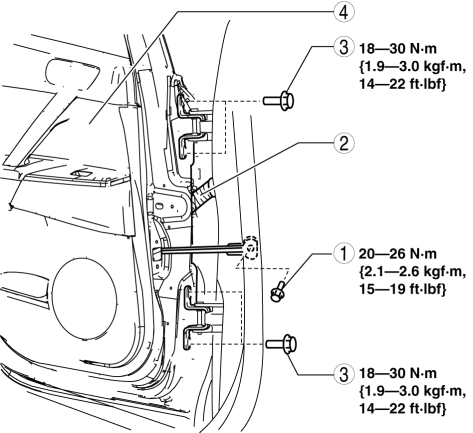
2. Remove in the order indicated in the table.
|
1 |
Bolt A |
|
2 |
Connector (See Connector Removal Note.) |
|
3 |
Bolt B |
|
4 |
Rear door |
3. Install in the reverse order of removal.
4. Adjust the rear door..
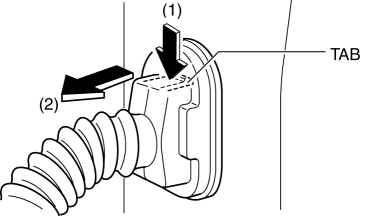
Connector Removal Note
1. While pressing the tab in the direction of arrow (1), disconnect the connector in the direction of arrow (2).
 Rear Door Pad Removal/Installation
1. Fully open the rear door glass.
2. Disconnect the negative battery cable..
3. Remove the following parts:
a. Rear door trim.
b. Rear door speaker.
c. Rear power window motor.
d. Rear do ...
 Rear Outer Handle Removal/Installation
1. Fully close the rear door glass.
2. Disconnect the negative battery cable..
3. Remove the rear door trim..
4. Remove the service hole cover.
5. Remove the screw from the service hole.
...
Other materials:
Rear View Monitor Operation
The operation of the rear view monitor when reversing the vehicle varies
depending on
the traffic, road, and vehicle conditions. The amount of steering and the
timing also varies
depending on conditions, so confirm the surrounding conditions directly with
your eyes and
steer the vehicle in ...
Console Removal/Installation
1. Disconnect the negative battery cable..
2. Remove the following parts:
a. Upper panel.
b. Shift knob (MTX).
c. Selector lever knob (ATX).
d. Shift panel.
e. Side wall.
3. Remove the bolts.
4. Remove the screws.
5. Pull the console in the direction of the arrow shown in t ...
Variable Swirl Solenoid Valve Inspection [Mzr 2.3 Disi Turbo]
Airflow Inspection
1. Remove the battery cover..
2. Disconnect the negative battery cable..
3. Remove the variable swirl solenoid valve..
4. Inspect the airflow between the ports under the following conditions.
If not as specified, replace the variable swirl solenoid valve..
...
