
Mazda 3 Service Manual: Rear Wiper Arm And Blade Removal/Installation
1. Remove in the order indicated in the table.
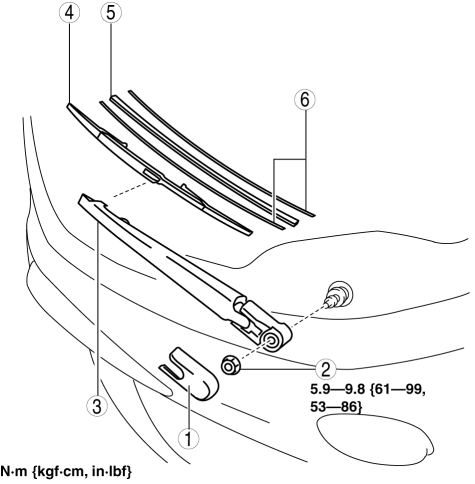
|
1 |
Cap |
|
2 |
Nut |
|
3 |
Rear wiper arm (See Rear Wiper Arm Installation Note.) |
|
4 |
Rear wiper blade |
|
5 |
Rubber brush |
|
6 |
Backing plate |
2. Install in the reverse order of removal.
3. Adjust the rear wiper arm and blade..
Rear Wiper Arm Installation Note
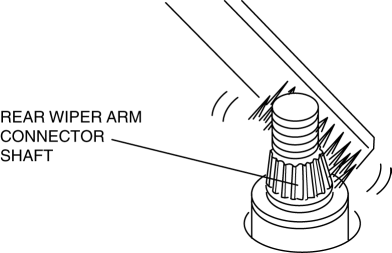
1. Clean the rear wiper arm connector shaft using a wire brush before installing the rear wiper arm.
 Rear Wiper Arm And Blade Adjustment
1. Turn off the rear wiper switch while operating the rear wiper motor, and then
stop the rear wiper at the auto stop position.
2. Set the rear wiper arm onto the ceramic end line.
...
 Rear Wiper Motor Inspection
1. Disconnect the negative battery cable..
2. Remove the following parts:
a. Rear wiper arm and blade.
b. Liftgate upper trim.
c. Liftgate side trim.
d. Liftgate lower trim.
3. Disconnect ...
Other materials:
Seat Weight Sensor Inspection [Two Step Deployment Control System]
CAUTION:
If any of the following work is performed, perform the seat weight sensor
inspection using the M-MDS.
Removal of the passenger-side seat
Loosening and retightening of passenger’s seat fixing bolts
Or, the vehicle is involved in a collision
...
Drive Belt Inspection [Skyactiv G 2.0]
Generator Drive Belt
NOTE:
The generator drive belt deflection/tension inspection is not necessary with
the adoption of the drive belt auto tensioner.
1. Verify that the indicator part of the cast hexagon on the drive belt auto
tensioner is within the normal range.
If ...
Front Bumper Removal/Installation
1. Disconnect the negative battery cable..
2. Remove the screw A and fasteners B.
3. Remove the screws C.
4. Remove the bolts D.
5. Remove the fasteners E, screw F and fastener G.
6. Pull the front bumper in the direction of the arrow in the order of (1), (2)
and (3), the ...
