
Mazda 3 Service Manual: Side Air Bag Sensor No. 1 Removal/Installation [Two Step Deployment Control System]
WARNING:
-
Handling the side air bag sensor improperly can accidentally operate (deploy) the air bag module, which may seriously injure you. Read the air bag system service warnings and cautions before handling the side air bag sensor..
1. Switch the ignition to off.
2. Disconnect the negative battery cable and wait for 1 min or more
..
3. Remove the front scuff plate..
4. Remove the rear scuff plate..
5. Remove the B-pillar lower trim..
6. Remove the nut.
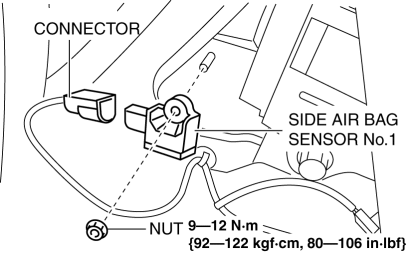
7. Remove the side air bag sensor No.1.
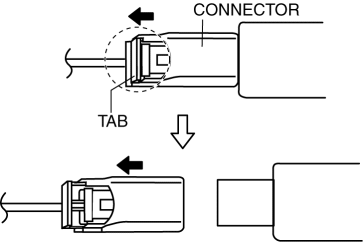
8. Disconnect the connector from the side air bag sensor No.1 by pressing the connector tab in the direction of the arrow.
9. Install in the reverse order of removal.
10. Switch the ignition to ON.
11. Verify that the air bag system warning light illuminates for approx. 6 s
and goes out.
-
If the air bag system warning light does not operate normally, refer to the on-board diagnostic system (air bag system) and perform inspection of the system..
 Seat Weight Sensor Removal/Installation [Two Step Deployment Control System]
CAUTION:
When the seat weight sensor is replaced with a new one, perform the seat
weight sensor calibration using the M–MDS..
When replacing the seat weight sensor, replace it ...
 Side Air Bag Sensor No. 2 Removal/Installation [Two Step Deployment Control
System]
Side Air Bag Sensor No. 2 Removal/Installation [Two Step Deployment Control
System]
WARNING:
Handling the side air bag sensor improperly can accidentally operate (deploy)
the air bag module, which may seriously injure you. Read the air bag system
service warnings and ca ...
Other materials:
Customization
Customizable features
The Subaru Solterra is equipped with a wide range of configurable
electronic systems that allow you to tailor vehicle behavior and comfort settings
according to your personal preferences. These adjustments can be performed via the
multi-information display, the multimedi ...
Liftgate Hinge Removal/Installation
1. Disconnect the negative battery cable..
2. Remove the following parts:
a. Rear scuff plate.
b. Rear seat cushion.
c. Rear seat back.
d. Lower anchor installation bolts on the rear seat belt.
e. Tire house trim.
f. Trunk end trim.
g. Trunk side upper trim.
h. Trunk side trim.
i ...
Vacuum Line Inspection
MZR 2.0, MZR 2.5, MZR 2.3 DISI Turbo
1. Remove the vacuum hose..
2. Verify that air can be blown from the power brake unit side of the vacuum
hose towards the intake manifold side, and that air cannot be blown in the opposite
direction.
If there is any malfunction of the inner che ...
