
Mazda 3 Service Manual: Wheel Alignment Pre Inspection
1. Park the vehicle on a level ground, in an unloaded condition*, and with the wheels straight forward.
*: Unloaded condition.....Fuel tank is full. Engine coolant and engine oil are at specified level. Spare tire, jack and tools are in designated position.
2. Inspect the tire pressure.
-
Adjust to the recommended pressure if necessary..
3. Inspect the wheel bearing play.
-
Correct if necessary..
4. Inspect the wheel runout.
-
Correct if necessary..
5. Rock the vehicle, and verify that there is no looseness in the steering wheel joint and suspension ball joint.
6. Rock the vehicle, and verify that the shock absorber operates properly.
7. Measure height H from the center of the wheel to the fender brim.
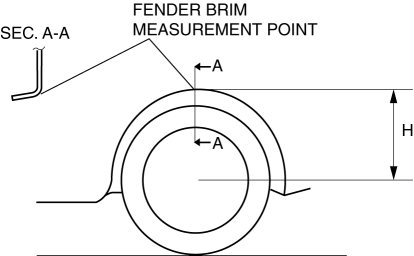
8. Verify that the difference between the left and right dimension H is within the specification.
-
If it exceeds the specification, repeat the Step 2—7.
-
Standard
-
10 mm {0.39 in} or less
 Tire House Trim Removal/Installation
4SD
1. Remove the rear seat cushion..
2. Remove the rear scuff plate..
3. Partially peel back the seaming welt.
4. Remove the fastener.
5. Pull the tire house trim in the direction of arrow s ...
 Wheel Balance Adjustment
CAUTION:
Adjust the outer wheel balance first, then the inner wheel balance.
Be careful not to scratch the wheels.
Adhesive-type Balance Weight (Outer)
1. Remove the old balance ...
Other materials:
Blower Motor Removal [Manual Air Conditioner]
NOTE:
The blower motor is located on the A/C unit as shown in the figure.
Perform the work from the front passenger side in the posture shown in the
figure.
1. Set the air intake mode to FRESH.
2. Disconnect the negative battery cable.
3. Remove the following ...
Oil Control Valve (OCV) Inspection [Skyactiv G 2.0]
Coil Resistance Inspection
1. Remove the battery cover..
2. Disconnect the negative battery cable..
3. Remove the plug hole plate..
4. Disconnect the OCV connector.
5. Measure the resistance between terminals A and B using an ohmmeter.
OCV coil resistance
6.9—7.5 ohms [20°C ...
Uniform Tire Quality Grading System
(UTQGS)
This information relates to the tire grading system developed by the U.S.
National Highway
Traffic Safety Administration for grading tires by tread wear, traction, and
temperature
performance.
Tread Wear
The tread wear grade is a comparative rating based on the wear rate of the
tire when t ...
