
Mazda 3 Service Manual: Clutch Disc Inspection [C66 M R]
Operation Inspection
1. Inspect the lining surface for discoloration and grease adhesion.
2. Inspect the torsion spring for weakness and the rivet for looseness.
3. Using a vernier caliper, measure the depth between the lining surface and the rivet head.
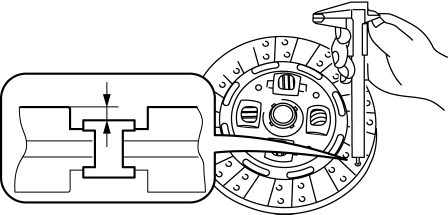
-
Minimum clutch disc thickness
-
0.3 mm {0.01 in}
-
If it is less than the minimum specification, replace the clutch disc..
4. Measure the clutch disc runout using a dial gauge.
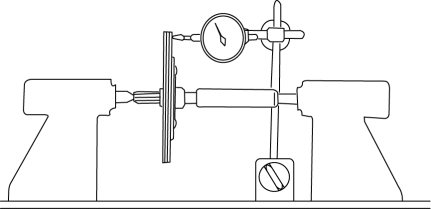
-
Maximum clutch disc runout
-
0.7 mm {0.03 in}
-
If it exceeds the maximum specification, replace the clutch disc..
 Clutch Cover Inspection [C66 M R]
1. Remove the clutch cover..
2. Perform the following procedures to inspect the clutch cover.
If it exceeds the maximum specification, replace the clutch cover..
a. Measure the wear of ...
 Clutch Fluid Inspection [C66 M R]
NOTE:
A common reserve tank is used for the clutch system and brake system.
1. Verify that the clutch fluid is between the MIN mark and the MAX mark.
Verify that there is no ...
Other materials:
Front Shock Absorber Disposal
1. Place the front shock absorber on a level surface or with the piston pointing
downwards.
2. Drill a 2—3 mm {0.08—0.11 in} hole at the point A shown in the figure
so that the gas can escape.
WARNING:
Whenever drilling into a shock absorber, wear protective eye wear. The gas ...
Solenoid Valve Removal/Installation [FS5 A EL]
WARNING:
A hot transaxle and ATF can cause severe burns. Turn off the engine and wait
until they are cool.
Primary Control Valve Body
1. Remove the primary control valve body.
a. Remove the battery cover..
b. Disconnect the negative battery cable.
c. Remove the aerodynamic un ...
Cleaning and protecting the vehicle interior
For the Subaru Solterra, interior cleaning should always be performed
according to the specific material of each component in order to preserve durability,
appearance, and long-term comfort.
Protecting the vehicle interior
In the Subaru Solterra, begin cleaning by removing dust and debris u ...
