
Mazda 3 Service Manual: Airflow Mode Actuator Inspection [Full Auto Air Conditioner]
CAUTION:
-
If the lever position exceeds the operation range shown in the figure, the circuit in the actuator could be damaged. Always perform an actuator operation inspection with the lever movement within the range shown in the figure.
1. Connect battery positive voltage to airflow mode actuator terminal D (or F), connect terminal F (or D) to ground, and then verify that the airflow mode actuator operates as shown in the table.
-
If the operation condition is not normal, replace the airflow mode actuator.
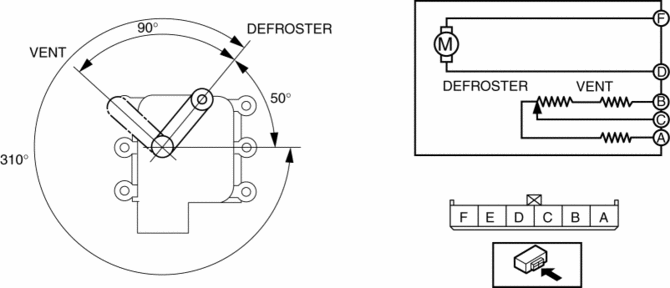
|
Terminal |
Airflow mode actuator operation |
|
|
D |
F |
|
|
B+ |
Ground |
DEFROSTER → VENT |
|
Ground |
B+ |
VENT → DEFROSTER |
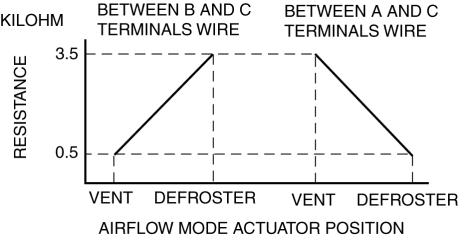
2. Verify that the resistance between terminals B and C, C and A matches the airflow mode actuator operation as shown in the graph.
-
If the operation condition and resistance are not normal, replace the airflow mode actuator.
 Air Mix Actuator Removal/Installation [Full Auto Air Conditioner]
Driver-side
1. Disconnect the negative battery cable..
2. Disconnect the connector.
3. Remove the hook (1), remove the rod (2) from the air mix actuator link.
4. Remove the screw.
5. ...
 Airflow Mode Actuator Removal/Installation [Full Auto Air Conditioner]
1. Set the air intake mode to FRESH.
2. Set the air mix mode to MAX COLD.
3. Disconnect the negative battery cable..
4. Remove the following parts:
a. Front doors.
b. Front scuff plate.
c. ...
Other materials:
Adjuster Anchor Removal/Installation
WARNING:
The side air bag sensor is attached to the lower part of the B-pillar. When
working around the B-pillar, disconnect the negative battery cable or work carefully,
avoiding excessive impact to the lower part of the B-pillar.
1. Remove the following parts:
a. Front sc ...
Battery Inspection [Skyactiv G 2.0]
WARNING:
Since battery acid is toxic, be careful when handling the battery.
Since battery acid is highly corrosive, be careful not to allow it to contact
clothing or the vehicle.
In case battery acid contacts skin, eyes, or clothing, flush it immediately
with running wa ...
Remote Air Conditioning System
In the Subaru Solterra, the Remote Air Conditioning System utilizes
energy stored in the traction battery to allow the climate control system to be
activated remotely, providing a comfortable cabin environment before entering the
vehicle.
When the Subaru Solterra is connected to a charging ...
