
Mazda 3 Service Manual: Audio Unit Disassembly/Assembly
CAUTION:
-
When disassembling the audio unit, it could get scratched if it is placed directly on the ground. When disassembling the audio unit, spread a soft cloth underneath to perform the work.
1. Disassemble in the order indicated in the table.
2. Assemble in the reverse order of disassembly.
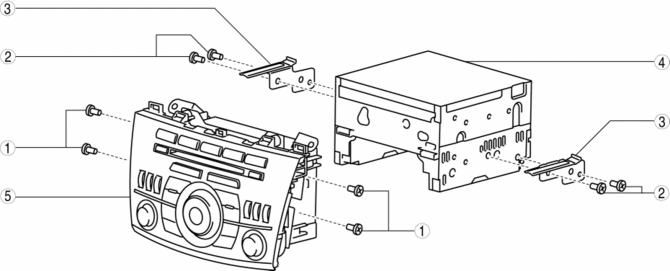
|
1 |
Screw A |
|
2 |
Screw B |
|
3 |
Bracket |
|
4 |
Audio unit |
|
5 |
Audio panel |
 Audio Unit
NOTE:
“iPod” is a registered trademark of Apple Inc. in the United States and other
countries.
Purpose
The audio unit controls the CD, radio, exterior input devices (AUX/US ...
 Audio Unit Removal/Installation
Without Display
CAUTION:
When installing the audio unit, make sure that the wiring harness and antenna
feeder are not caught between the unit and dashboard. If the wiring harness
or the ...
Other materials:
Vanity Mirror Illumination Bulb Removal/Installation
1. Disconnect the negative battery cable..
2. Insert a tape-wrapped fastener remover into the service hole, and pry it in
the direction indicated by the arrow to remove the lens.
3. Remove the vanity mirror illumination bulb.
4. Install in the reverse order of removal. ...
Active Command Modes Inspection [Blind Spot Monitoring (Bsm)]
1. Connect the M-MDS (IDS) to the DLC-2.
2. After the vehicle is identified, select the following items from the initialization
screen of the IDS.
a. Select “DataLogger”.
b. Select “Modules”.
c. Select “BSML” or “BSMR”.
3. Select the simulation items from the PID tabl ...
Reporting Safety Defects
(U.S.A.)
If you believe that your vehicle has a defect which could cause a crash or
could cause
injury or death, you should immediately inform the National Highway Traffic
Safety
Administration (NHTSA) in addition to notifying Mazda Motor Corporation (Your
Mazda
Importer/Distributor).
If NHTSA re ...
