
Mazda 3 Service Manual: Clutch Pipe And Hose Removal/Installation [C66 M R]
CAUTION:
-
Do not allow clutch fluid get on a painted surface. Clutch fluid contains properties which can dissolve the paint. If clutch fluid gets on a painted surface, wash it off with water immediately and wipe the area off completely.
1. Remove the battery cover..
2. Disconnect the negative battery cable..
3. Remove the battery component. (ex: battery, battery tray and PCM component).
4. Remove the air cleaner component. (ex: air cleaner, air hose).
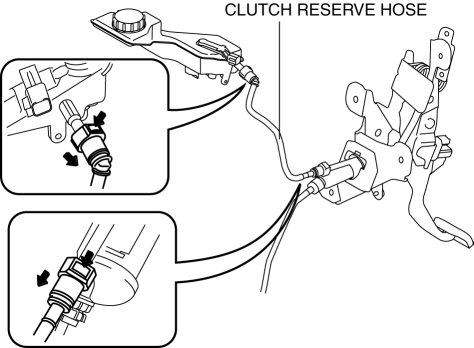
5. Remove the clutch reserve hose while pressing the point indicated by the arrow in the figure.
6. Remove the clutch pipe and hose (No.1 and No.2)clutch pipe and hose (No.1 and No.2).
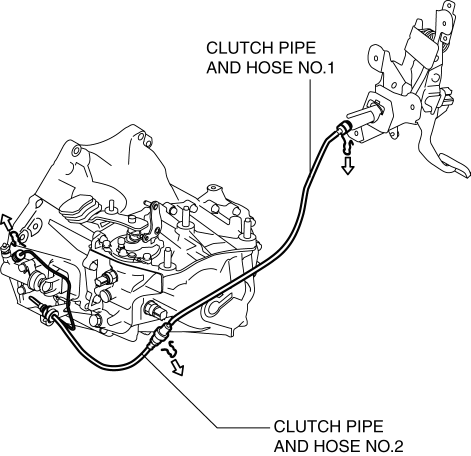
a. Lift the connector clip.
b. Pull out the clutch pipe and hose (No.1 and No.2) connector straight to detach it.
c. Remove the clutch pipe and hose (No.1 and No.2).
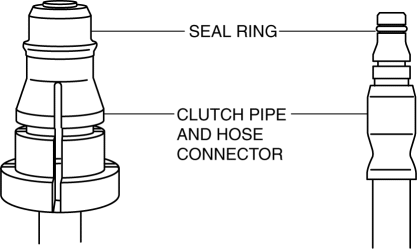
7. Verify that the seal ring is installed to the clutch pipe and hose connector.
CAUTION:
-
When removing the clutch pipe and hose, the seal ring for the clutch pipe and hose could remain on the receiving area of the connector. If the clutch pipe and hose is assembled under this condition, it could cause clutch fluid leakage from the connector.
8. Install the clutch pipe and hose (No.1 and No.2).
a. Press in the connector clip.
b. Insert the clutch pipe and hose (No.1 and No.2) connector straight.
NOTE:
-
When the connector is engaged, a click sound is heard.
c. Install the clutch pipe and hose (No.1 and No.2).
9. Insert the clutch reserve hose connector straight.
NOTE:
-
When the connector is engaged, a click sound is heard.
10. Pull each engagement of the clutch reserve hose and clutch pipe and hose No.1 and 2, verify that they are engaged, and then press all of them again.
11. Install in the reverse order of removal.
12. Bleed the air from the clutch system..
 Clutch Pedal Removal/Installation [C66 M R]
CAUTION:
Secure the steering wheel using tape or a cable to prevent the steering shaft
from rotating after disconnecting the steering shaft. If the steering wheel
rotates after the steer ...
 Clutch Release Collar Inspection [C66 M R]
CAUTION:
Do not clean the clutch release collar with cleaning fluids or a steam cleaner
because it is filled with grease.
Operation Inspection
1. Turn the collar while applying force ...
Other materials:
Unfastening the Seat Belt
Depress the button on the seat belt buckle.
If the belt does not fully retract, pull it out
and check for kinks or twists. Then make
sure it remains untwisted as it retracts.
NOTE
If a belt does not fully retract, inspect
it for kinks and twists. If it is still not
retracting properly, ...
Oil Seal (Differential) Replacement [G66 M R]
1. On level ground, jack up the vehicle and support it evenly on safety stands.
2. Remove the aerodynamic under cover No.2..
3. Drain the oil from the transaxle..
4. Remove the front splash shield..
5. Separate the drive shaft and joint shaft from the transaxle..
6. Remove the oil seals u ...
Manual Transaxle Shift Mechanism Removal/Installation [A26 M R]
1. Remove the battery cover..
2. Disconnect the negative battery cable.
3. Remove the battery and battery tray..
4. Remove the air cleaner and air inlet hose..
5. Remove the aerodynamic under cover NO.2..
6. Remove the tunnel member (rear)..
7. Remove the upper panel..
8. Remove the sh ...
