
Mazda 3 Service Manual: Hood Adjustment
Gap Adjustment
1. Verify that the gap between the hood and the body is within the specification.
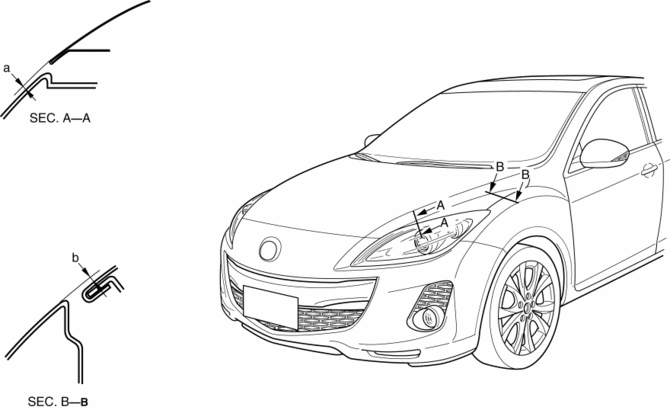
-
Standard clearance
-
a: -2.8—0.8 mm {-0.11—0.03 in}
-
b: –1.2—1.2 mm {–0.047—0.0.47 in}
2. Disconnect the negative battery cable..
3. Remove the following parts:
a. Front bumper.
b. Front combination light.
c. Front fender molding.
d. Side step molding.
e. Front fender panel.
4. Loosen the hood hinge installation bolts and adjust the hood.
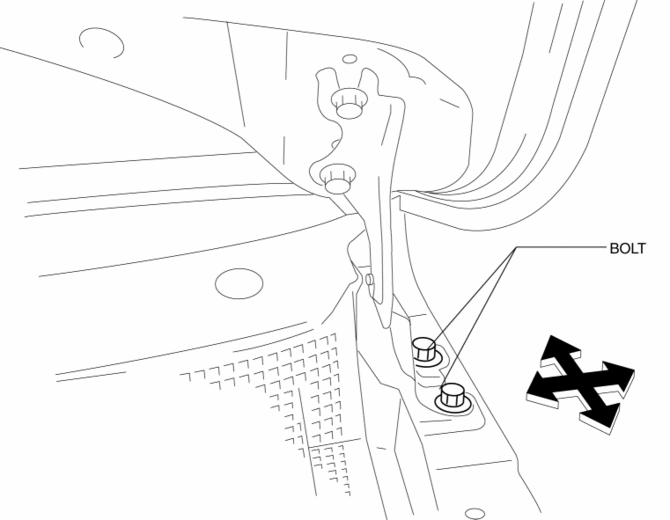
5. Tighten the bolts..
6. Install the following parts:
a. Front fender panel.
b. Side step molding.
c. Front fender molding.
d. Front combination light.
e. Front bumper.
7. Connect the negative battery cable..
Height Difference Adjustment
1. Verify that the height difference between the hood and the body is within the specification.
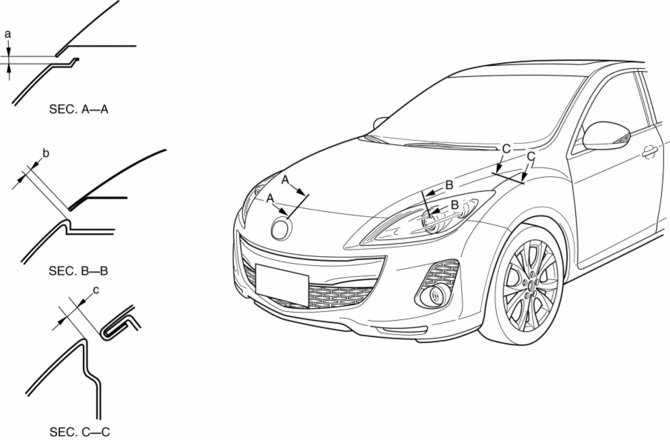
-
Standard clearance
-
a: 3.0—6.0 mm {0.12—0.23 in}
-
b: 1.9—5.1 mm {0.08—0.20 in}
-
c: 2.5—4.9 mm {0.10—0.19 in}
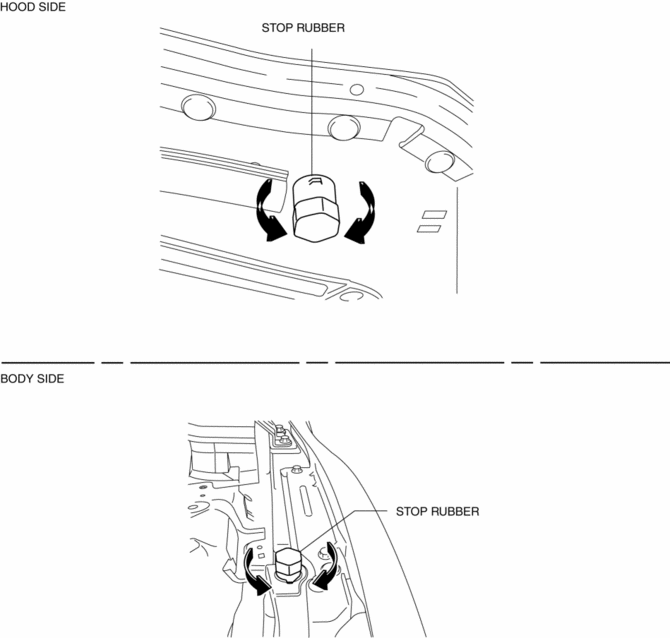
2. Turn the stop rubber to adjust the height of the hood.
 Front Outer Handle Removal/Installation
1. To access the glass installation bolt, position the front door glass so that
the distance from the top of the front door glass to the upper part of the front
beltline molding is approx. 80 mm { ...
 Hood Disassembly/Assembly
Except Mazdaspeed3
1. Disassemble in the order indicated in the table.
1
Weather strip parting seal
2
Weather strip shroud seal
...
Other materials:
General Procedures (Brake)
Wheel and Tire Installation
1. When installing the wheels and tires, tighten the wheel nuts in a criss-cross
pattern to the following tightening torque.
Tightening torque
88—118 N·m {9.0—12 Kgf·m, 65—87 ft·lbf}
Brake Lines Disconnection
1. If any brake line has been ...
Safety Practices
The way you drive has a great deal to do with your tire mileage and safety.
So cultivate good
driving habits for your own benefit.
Observe posted speed limits and drive at speeds that are safe for
the existing weather
conditions
Avoid fast starts, stops and turns
Avoid potholes and o ...
Rear Window Defogger
The rear window defogger clears fog from
the rear window.
The ignition must be switched ON to use
the defogger.
Press the switch to turn on the rear
window defogger. The rear window
defogger operates for about 15 minutes
and then turns off automatically.
The indicator light illuminates ...
