
Subaru Solterra 2023-2026 Owner's Manual: LCA (Lane Change Assist)
LCA functions
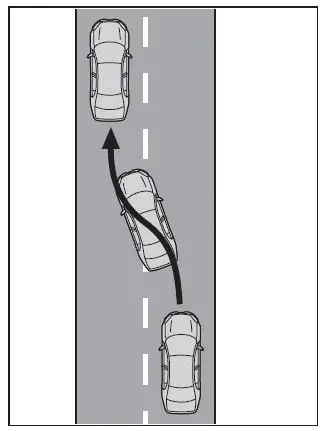
In the Subaru Solterra, the Lane Change Assist (LCA) system works in conjunction with Lane Tracing Assist (LTA) to support smoother and more controlled lane changes. By applying subtle steering inputs, the Subaru Solterra helps guide the vehicle into the adjacent lane when conditions are appropriate.
This feature is specifically designed for use on highways and expressways, where lane markings and traffic flow are consistent.
The driver always maintains full authority over the Subaru Solterra, and any steering input by the driver will immediately override system assistance.
The LCA system is not intended for use at intersections, junctions, or complex traffic environments.
WARNING
■ Before using the LCA system
- Do not rely solely on the Subaru Solterra LCA system.
The system does not replace the need for visual checks of adjacent lanes or surrounding traffic. The driver must always confirm that it is safe to change lanes and maintain control of the steering wheel.
Never attempt to use the Subaru Solterra LCA to enter restricted areas such as oncoming lanes, road shoulders, or unsafe zones.
- Failure to remain attentive and perform proper driving actions may result in an accident.
■ Operating conditions of function
The Subaru Solterra Lane Change Assist operates only when all of the following conditions are satisfied:
- The LTA system is active
- The LCA feature is enabled through customization settings
- The vehicle speed is approximately between 55 and 85 mph (90 to 140 km/h)
- A broken white lane marking is detected on the side of the intended lane change
- No vehicle is detected in the target lane
- The steering wheel is not being turned forcefully by the driver
- The hands-off steering wheel warning is not active
■ Cancelation of functions
The Subaru Solterra LCA function may be canceled with a warning display and buzzer under the following conditions:
- When required operating conditions are no longer met
- When lane markings can no longer be detected
- When the turn signal lever is pushed fully to the second position
- When the turn signal is activated in the opposite direction of the intended maneuver
- When driver inputs such as steering, braking, or acceleration are detected
If the Subaru Solterra detects a rapidly approaching vehicle in the target lane, it will alert the driver with a buzzer and on-screen message. At the same time, slight steering input may be applied to help maintain a safe distance.
■ Hands off steering wheel warning operation
If the Subaru Solterra detects that the driver is not holding the steering wheel, a warning message and indicator will appear on the display urging the driver to regain control. Once the system detects proper grip, the warning will be cleared.
Always keep your hands firmly on the steering wheel when using the Subaru Solterra LCA system.
■ Situations in which the hands off steering wheel warning may not operate properly
- Depending on vehicle condition, steering behavior, or road surface, the Subaru Solterra may not detect hands-off situations accurately.
- The system may fail to recognize that the driver’s hands are off the steering
wheel in the following situations:
- When a steering wheel cover is installed
- When the driver is wearing gloves
- When debris or contaminants are present on the steering wheel
- When gripping non-sensor areas such as trim sections or seams
- The Subaru Solterra LCA may continue operating even without proper hand
contact in cases such as:
- When objects other than hands are touching the wheel
- When arms or large objects are resting across the steering wheel
Operating the LCA
In the Subaru Solterra, when the turn signal lever is held lightly in the first position, the system recognizes the intended direction and initiates Lane Change Assist.
If you prefer to perform a manual lane change without system assistance, disable the LCA feature through customization settings.
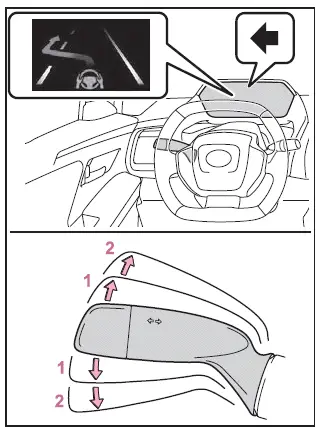
- First position: LCA active
- Second position: LCA inactive (manual lane change)
WARNING
■ Situations in which the LCA should not be used
- When driving on a single-lane road
- When there is no broken white line separating lanes
Enabling/disabling the system
The Subaru Solterra LCA system can be activated or deactivated through the vehicle’s customization settings menu.
Displays and system operation
The current operating status of the Subaru Solterra Lane Change Assist system is displayed on the instrument cluster for driver awareness.
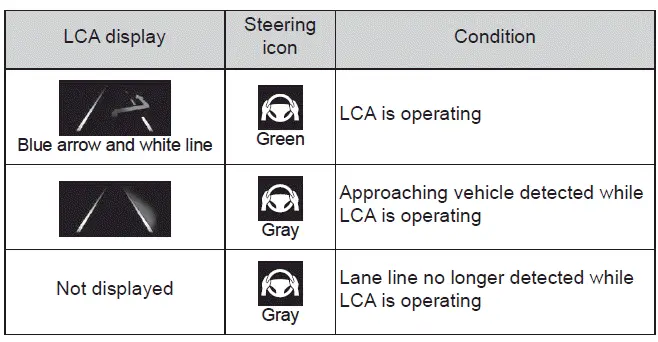
The Subaru Solterra LCA enhances highway driving comfort and safety, but must always be used with full driver attention and responsibility.
 LTA (Lane Tracing Assist)
LTA functions
In the Subaru Solterra, when driving on roads with clearly visible lane
markings and with dynamic radar cruise control activated, the system uses a
front camera and radar senso ...
 LDA (Lane Departure Alert)
Basic functions
In the Subaru Solterra, the Lane Departure Alert (LDA) system is designed to
assist the driver by monitoring the vehicle’s position relative to lane markings
or road boundaries* ...
Other materials:
Warm Up Three Way Catalytic Converter (Wu Twc) Inspection [Mzr 2.0, Mzr 2.5]
CAUTION:
Perform the following procedures, DTC P0421:00 is indicated only.
1. Connect the M-MDS to the DLC-2.
2. Start the engine and warm it up to normal operating temperature.
3. Turn off the engine.
4. Verify that the engine compression is within the specification..
...
Wiper Blades
CAUTION
Hot waxes applied by automatic car
washers have been known to aff ect the
wiper's ability to clean windows.
To prevent damage to the wiper blades,
do not use gasoline, kerosene, paint
thinner, or other solvents on or near
them.
When the wiper lever is i ...
Precaution
Intermittent Concern Troubleshooting
Vibration method
If a malfunction occurs or becomes worse while driving on a rough road or
when the engine is vibrating, perform the following steps.
NOTE:
There are several reasons why vehicle or engine vibration could cause an
electr ...
