
Subaru Solterra 2023-2026 Owner's Manual: LTA (Lane Tracing Assist)
LTA functions
- In the Subaru Solterra, when driving on roads with clearly visible lane markings and with dynamic radar cruise control activated, the system uses a front camera and radar sensors to detect lane boundaries as well as surrounding and preceding vehicles. Based on this data, the Subaru Solterra applies gentle steering input to help maintain a stable position within the lane.
This function in the Subaru Solterra is intended primarily for use on highways and expressways, where lane markings are consistent and traffic flow is predictable.
If the dynamic radar cruise control system is not active, the Subaru Solterra Lane Tracing Assist will not function.
In situations where lane markings are unclear or temporarily invisible, such as in traffic congestion, the Subaru Solterra may provide steering support by referencing the movement and trajectory of nearby vehicles.
If the system determines that the steering wheel has not been actively controlled for a certain period or detects that the driver is not maintaining a proper grip, the Subaru Solterra will issue a warning and temporarily suspend the function.
Once the driver firmly grips the steering wheel again, the Lane Tracing Assist in the Subaru Solterra will resume operation.
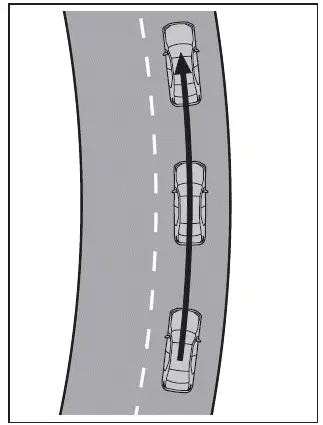
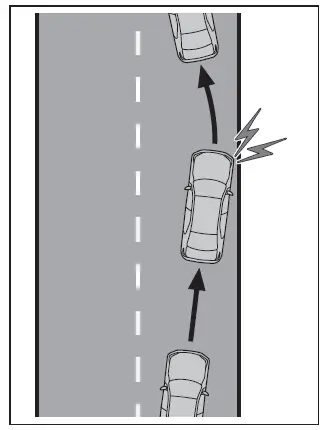
- While the Subaru Solterra LTA is active, if the vehicle begins to drift toward the edge of the lane, the system will notify the driver through a visual alert and audible warning.
When alerted, always check your surroundings and smoothly adjust the steering of your Subaru Solterra to return to the center of the lane.
WARNING
■ Before using the LTA system
- The Subaru Solterra Lane Tracing Assist is not an autonomous driving
system and does not replace the need for driver attention.
The driver is fully responsible for monitoring traffic conditions and maintaining proper steering control at all times. Regular breaks should be taken during long journeys to avoid fatigue.
- Failure to maintain proper control of the Subaru Solterra or to remain attentive may lead to accidents or unsafe situations.
- If the system is not needed, switch off the Subaru Solterra LTA using the dedicated control button.
■ Operating conditions of function
The Subaru Solterra LTA operates only when all of the following conditions are satisfied:
- The system detects clear lane markings or the movement path of surrounding vehicles
- Dynamic radar cruise control is engaged
- The lane width is approximately 10 to 13 ft. (3 to 4 m)
- The turn signal is not in use
- The vehicle is not navigating sharp curves
- Acceleration or deceleration is within a moderate range
- The steering wheel is not being turned forcefully by the driver
- The hands-off warning is not currently active
- The Subaru Solterra is traveling near the center of the lane
■ Temporary cancelation of functions
- If any operating conditions are no longer met, the Subaru Solterra LTA may temporarily deactivate. Once conditions return to normal, the system will automatically resume.
- A warning sound may be emitted when the function is canceled to notify the driver.
- The driver can override steering assistance at any time by manually turning the steering wheel.
■ Lane departure warning function when the LTA is operating
- Even if the Subaru Solterra is configured to use steering wheel vibration as the lane departure alert, when LTA is active, a buzzer will sound if the vehicle begins to leave the lane.
- If steering input consistent with a lane change is detected, the Subaru Solterra will interpret this as intentional and suppress the warning.
■ Hands off steering wheel warning operation
- If the Subaru Solterra detects that the driver is not holding the steering wheel, a message and visual indicator will appear prompting the driver to regain control. Once proper contact is detected, the warning will be canceled. Always keep your hands on the wheel, even when assistance is active.
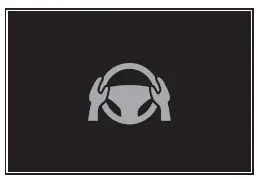
- If no steering input is detected for a certain duration, the Subaru Solterra will issue a warning and temporarily disable the system. This may also occur if only minimal steering input is applied continuously.
■ Situations in which the hands off steering wheel warning may not operate properly
- Depending on vehicle condition, steering input characteristics, or road surface, the Subaru Solterra warning system may not function accurately.
- In the following situations, the system may not detect that the driver’s
hands are off the steering wheel:
- When a steering wheel cover is installed
- When the driver is wearing gloves
- When dirt or foreign material is present on the steering wheel
- When the driver grips areas of the wheel without sensors, such as trim or seams
- In some cases, the Subaru Solterra may continue LTA operation even when
hands are not on the wheel:
- When objects other than hands are in contact with the wheel
- When arms or large objects rest across the steering wheel
Enabling/disabling the system
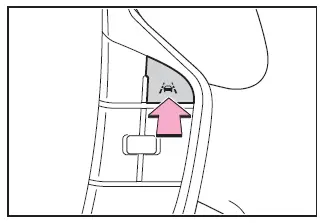
The Subaru Solterra LTA system can be toggled ON or OFF by pressing the LTA switch.
When activated, the Subaru Solterra LTA indicator will illuminate on the display.
WARNING
■ Situations in which the functions may not operate properly
In the following situations, the Subaru Solterra LTA system may not perform as expected, and the vehicle could unintentionally deviate from its lane. Always remain attentive and maintain full control of the steering.
- When nearby vehicles change lanes, the Subaru Solterra may follow their movement
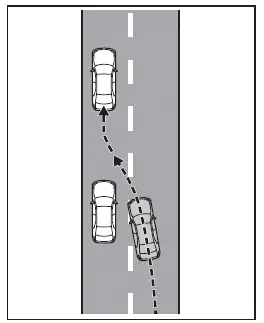
- When surrounding vehicles sway, the Subaru Solterra may mirror that motion
- When a nearby vehicle departs from its lane, the Subaru Solterra may also drift
- When a vehicle ahead is driving very close to lane markings
- When moving objects or roadside structures influence vehicle perception
- When crosswinds or turbulence from other vehicles affect stability
- When sensor performance is reduced due to environmental conditions
- When lane markings are unclear or undetectable
- When it is necessary to disable the system for safety reasons
Operation display of steering wheel operation support
The Subaru Solterra provides visual feedback on the current operating status of the Lane Tracing Assist system.
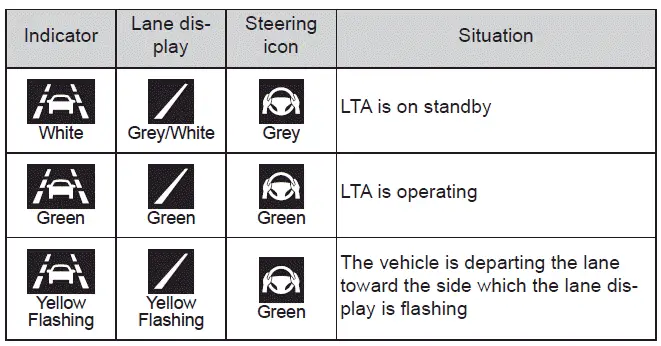
This system in the Subaru Solterra enhances lane stability and driving comfort, but must always be used with full driver awareness and responsibility.
 PCS (Pre-Collision System)
In the Subaru Solterra, the Pre-Collision System (PCS) utilizes advanced
sensors and monitoring technology to continuously scan the road ahead. When the
system detects a potential obstacle and det ...
 LCA (Lane Change Assist)
LCA functions
In the Subaru Solterra, the Lane Change Assist (LCA) system works in conjunction
with Lane Tracing Assist (LTA) to support smoother and more controlled lane changes.
By applying sub ...
Other materials:
Seat belts
Before driving your Subaru Solterra, always confirm that every occupant
is properly secured with a seat belt. Correct usage of seat belts is one of the
most critical safety measures in preventing serious injuries.
WARNING
Carefully follow the precautions below to minimize the risk of injury du ...
Driver monitor
Basic functions
In the Subaru Solterra, the driver monitoring system continuously observes the
driver during operation using an advanced in-cabin camera. It analyzes the driver’s
head position, gaze direction, and whether the eyes are open or closed.
Based on this data, the Subaru Solterra e ...
Gauges and meters
In the Subaru Solterra, the gauges and meters are designed to provide
the driver with clear, real-time driving information, helping to maintain awareness
of vehicle performance, battery condition, and overall system status during every
journey.
Meter display
■ Locations of gauges and meter ...
