
Subaru Solterra 2023-2026 Owner's Manual: PCS (Pre-Collision System)
In the Subaru Solterra, the Pre-Collision System (PCS) utilizes advanced sensors and monitoring technology to continuously scan the road ahead. When the system detects a potential obstacle and determines that the likelihood of a frontal collision is increasing, it first alerts the driver and enhances braking readiness. If the risk escalates further, the Subaru Solterra can automatically apply the brakes to help avoid the collision or minimize its severity.
The Subaru Solterra PCS can be customized, allowing the driver to enable or disable the system and adjust the timing of warning alerts according to driving preferences.
WARNING
■ For safe use
- The driver of the Subaru Solterra is always responsible for safe driving.
Maintain constant awareness of road conditions and surrounding traffic, and
never rely solely on the Pre-Collision System instead of normal braking.
The system cannot prevent or reduce the severity of every collision. Excessive reliance on the Subaru Solterra PCS may result in dangerous situations and serious accidents.
- Although the Subaru Solterra Pre-Collision System is engineered to assist
in mitigating collisions, its effectiveness varies depending on environmental,
road, and vehicle conditions.
Carefully review all operational limitations.
Always operate the Subaru Solterra with full attention and caution.
■ When to disable the pre-collision system
There are specific situations where it is recommended to temporarily disable the Subaru Solterra PCS to prevent unintended system behavior.
Detectable objects
The Subaru Solterra PCS is capable of identifying a range of objects in front of the vehicle. Detection capability may vary depending on the active function.
- Vehicles
- Bicycles*
- Pedestrians
- Motorcycles*
- Walls or large stationary obstacles
*: Bicycles and motorcycles are recognized when they are being ridden.
System functions
■ Pre-collision warning
When the Subaru Solterra determines that the risk of a collision is increasing, it will emit an audible warning and display a visual alert on the multi-information display, prompting the driver to take immediate action.
If the detected object is another vehicle, the Subaru Solterra may also apply light braking simultaneously with the warning to assist in slowing down.
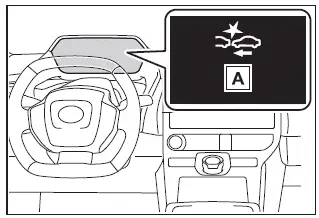
- "Pre-Collision System"
If the Subaru Solterra detects that the accelerator pedal is being pressed aggressively during a potential collision scenario, an additional warning will be displayed to alert the driver.
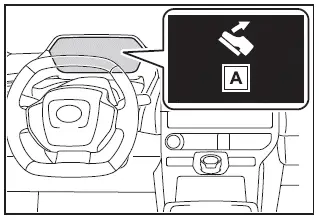
- "Accelerator Pedal is Pressed"
■ Pre-collision brake assist
When the Subaru Solterra identifies a high collision risk and detects insufficient braking input from the driver, the system will automatically increase braking force to enhance stopping performance.
■ Pre-collision brake control
If the system determines that a collision is imminent, the Subaru Solterra will automatically apply strong braking force in an effort to prevent the collision or reduce its impact.
■ Emergency steering assist
Under certain conditions, the Subaru Solterra can provide steering assistance in addition to braking support to help avoid obstacles while maintaining lane stability.
During this process, the system will display an alert on the multi-information display alongside the pre-collision warning.
- When the probability of collision is high
- When there is enough space within the lane to perform an avoidance maneuver
- When the driver is actively steering
In Subaru Solterra models equipped with active steering support, both braking and steering inputs may be adjusted automatically to assist in avoiding a collision or minimizing impact severity, regardless of the driver’s steering action.
While this assistance is active, warning messages will continue to inform the driver of system operation.
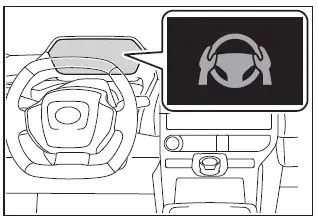
The Subaru Solterra Pre-Collision System is a key component of modern driving safety, combining detection, warning, braking, and steering support to help the driver respond more effectively to potential hazards.
■ Intersection collision avoidance support (left/right turn)
In the Subaru Solterra, the Pre-Collision System includes advanced intersection support designed to assist the driver during turning maneuvers. When making a left or right turn at an intersection, if the system detects a high probability of a collision, it will activate both the pre-collision warning and automatic braking functions. However, depending on road layout and visibility conditions, the Subaru Solterra system may not always respond perfectly.
- When turning left or right and crossing the path of an oncoming vehicle, the Subaru Solterra will attempt to detect the risk and intervene accordingly.
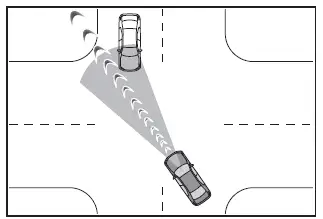
- When turning left or right and a pedestrian or cyclist is detected in the intended path, the Subaru Solterra system may issue warnings and apply braking assistance.
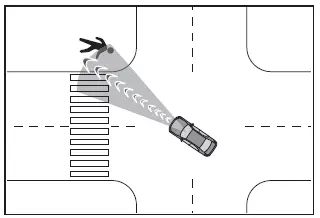
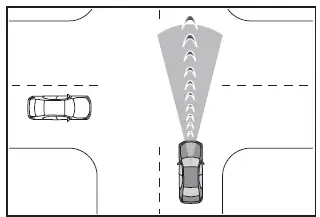
■ Intersection collision avoidance support (crossing vehicles)
At intersections or similar environments, the Subaru Solterra PCS can also monitor for vehicles or motorcycles approaching from the side. If a potential collision is detected, warning alerts and braking support will be activated. As with all driver assistance systems, performance may vary depending on the specific intersection geometry and visibility.
■ Acceleration Suppression at Low Speed
When operating the Subaru Solterra at low speeds, if the accelerator pedal is pressed forcefully and the system detects a possible collision ahead, it will limit EV power output or apply light braking to reduce acceleration. This function helps prevent unintended rapid movement in confined spaces.
During activation, a warning buzzer will sound and a visual alert will appear on the Subaru Solterra multi-information display to notify the driver.
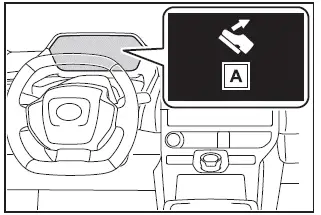
- "Accelerator Pedal is Pressed"
WARNING
■ Pre-collision braking
- When activated in the Subaru Solterra, the pre-collision braking system can apply strong braking force suddenly.
- This system is not designed to keep the vehicle stationary. If the Subaru Solterra comes to a stop due to automatic braking, the driver must immediately apply the brake pedal to maintain the stop.
- If the driver strongly presses the accelerator or makes sharp steering inputs, the Subaru Solterra may interpret this as intentional evasive action and may limit or cancel automatic braking intervention.
- If the brake pedal is already being pressed, the system may delay additional braking assistance, assuming the driver is actively responding.
■ Acceleration Suppression at Low Speed
If the steering wheel is being turned significantly, the Subaru Solterra may determine that the driver is actively maneuvering to avoid an obstacle. In such cases, the acceleration suppression function may not activate or may be canceled.
■ Emergency steering assist
- The Subaru Solterra emergency steering assist will deactivate once the system determines that lane departure prevention has been completed.
- Depending on driver input, the system may not activate or may stop operating:
- If the accelerator pedal is pressed aggressively, the steering wheel is turned sharply, the brake pedal is applied, or the turn signal is used, the Subaru Solterra may interpret these as driver-initiated evasive actions and cancel assistance.
- While active, if strong driver input is detected (accelerator, steering, or braking), the system may disengage to prioritize driver control.
- If the steering wheel is turned in the opposite direction of system assistance, emergency steering support will be immediately canceled.
■ Operating conditions of each function of the pre-collision system
The Subaru Solterra integrates multiple safety layers within the Pre-Collision System, but each function operates only under specific conditions. Understanding these limitations helps ensure proper use and maximizes the effectiveness of the Subaru Solterra advanced safety technologies.
The Subaru Solterra Pre-Collision System remains active when enabled and continuously evaluates the likelihood of a frontal collision with detected objects. When the system determines that a collision risk is elevated, it prepares to assist the driver through warnings and braking support.
However, there are specific situations in which the Subaru Solterra PCS will not operate:
- Immediately after reconnecting the 12-volt battery, until the vehicle has been driven for a certain distance
- When the shift position is set to R (Reverse)
- When the VSC OFF indicator is illuminated (in this case, only the pre-collision warning function remains available)
The following outlines the operating speed ranges and cancellation conditions for each Subaru Solterra PCS function:
- Pre-collision warning
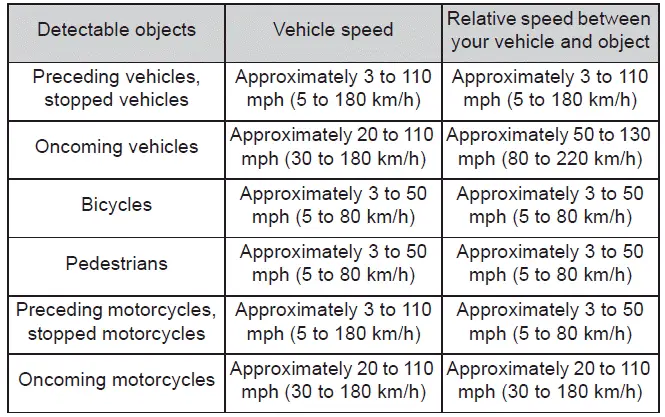
While the Subaru Solterra pre-collision warning is active, abrupt or strong steering input may cause the warning to be canceled, as the system may interpret this as driver-initiated evasive action.
- Pre-collision brake assist
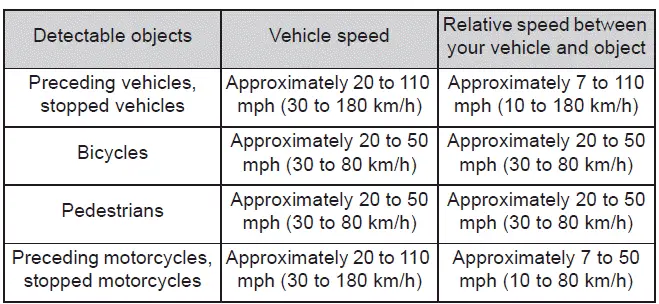
- Pre-collision braking
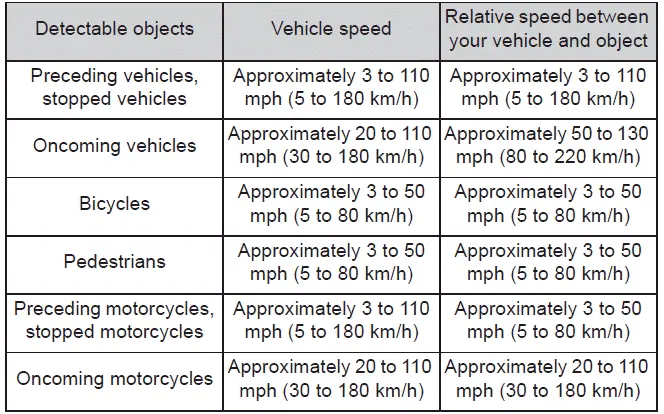
If any of the following actions occur while the Subaru Solterra pre-collision braking function is engaged, the system may cancel automatic braking:
- The accelerator pedal is pressed forcefully
- The steering wheel is turned sharply or suddenly
- Emergency steering assist
The Subaru Solterra emergency steering assist will not activate if the turn signal indicators are in use.
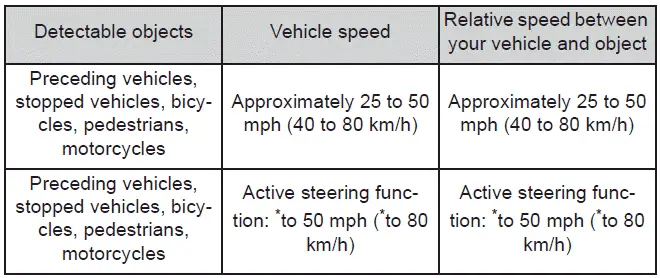
*: Minimum vehicle speed indicates the threshold below which collision avoidance through braking alone becomes less effective.
During emergency steering assistance, the system may disengage if any of the following driver actions are detected:
- Strong acceleration input
- Sudden or forceful steering movements
- Brake pedal application
- Intersection collision avoidance support (left/right turn)
The Subaru Solterra intersection support system for turning maneuvers requires active turn signal usage. If the turn signal is not engaged, the system will not operate.
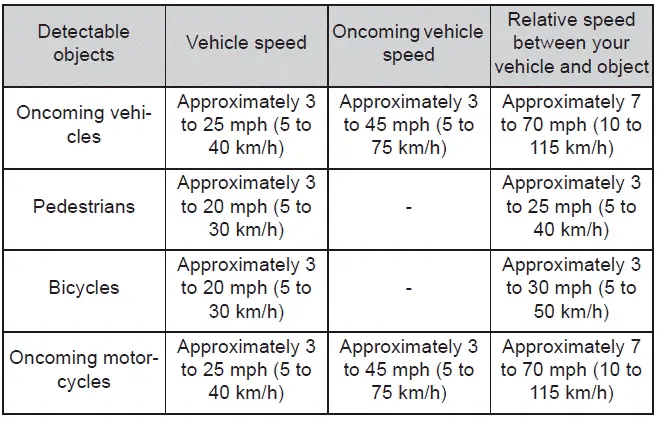
- Intersection collision avoidance support (crossing vehicles)
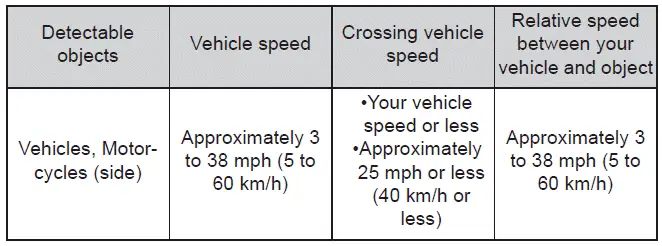
Vehicles without front side radars
Vehicles with front side radars
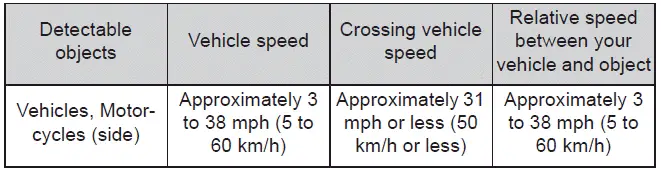
When traveling at approximately 29 mph (40 km/h) or higher, the Subaru Solterra PCS will only respond to crossing vehicles moving at speeds of approximately 29 mph (40 km/h) or lower.
The system operates when the speed of the crossing vehicle is equal to or less than that of the Subaru Solterra.
- Acceleration Suppression at Low Speed
This function in the Subaru Solterra will not activate when the turn signals are in operation.
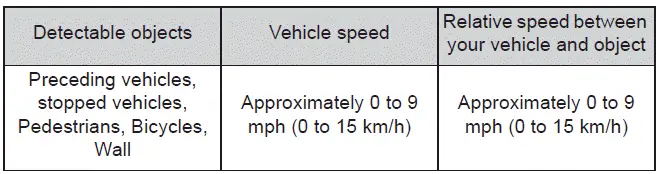
While the low-speed acceleration suppression feature is active, it may be canceled if any of the following actions occur:
- The accelerator pedal is released
- The steering wheel is turned sharply or abruptly
■ Detection of detectable objects
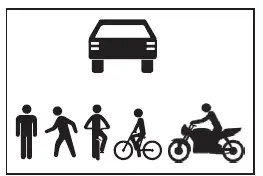
The Subaru Solterra PCS identifies objects based on factors such as size, shape, and motion patterns.
However, detection capability may vary depending on environmental conditions such as lighting, object movement, orientation, and direction. In some cases, the system may not recognize objects correctly, affecting its performance.
The system is designed to recognize objects with shapes similar to the following:
Understanding these operating conditions helps drivers use the Subaru Solterra Pre-Collision System more effectively and safely in real-world driving scenarios.
■ Situations in which the system may operate even though the possibility of a collision is not high
- Under certain driving conditions, the Subaru Solterra Pre-Collision System
may interpret surroundings as potentially hazardous and activate even when an
actual collision risk is low. Examples include:
- When passing close to a detectable object such as another vehicle
- When changing lanes while overtaking a detectable object in the Subaru Solterra
- When rapidly approaching a detectable object
- When driving near roadside objects such as guardrails, poles, trees, or walls
- When approaching the entrance of a curve where roadside objects are present
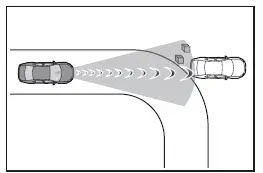
- When road markings or patterns ahead resemble detectable objects
- When passing a vehicle that is turning or changing lanes
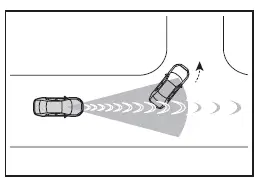
- When passing a vehicle that has stopped to make a turn
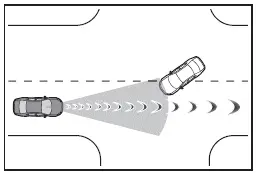
- When a vehicle stops suddenly in front of the Subaru Solterra
- When passing beneath overhead structures such as traffic signs or billboards
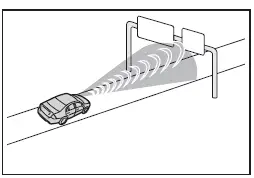
- When approaching barriers such as toll gates or parking arms that open and close
- When turning and encountering crossing pedestrians, bicycles, motorcycles, or oncoming vehicles
- When attempting a turn in front of moving traffic
- When objects change direction suddenly just before entering the Subaru Solterra path
- When oncoming vehicles turn across the vehicle’s path
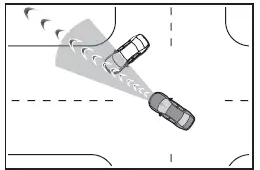
- When steering toward the path of an approaching vehicle
- When objects move above or below the roadway
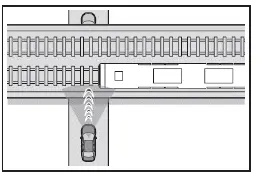
■ Situations in which the system may not operate properly
- In some cases, the Subaru Solterra front sensors may not detect objects
correctly, which can limit system performance. These situations include:
- When a detectable object is moving toward the Subaru Solterra
- When either the Subaru Solterra or the detected object is swaying or unstable
- When a detectable object performs sudden maneuvers such as rapid acceleration, braking, or swerving
- When approaching an object abruptly at close range
- When objects are located near structures such as walls, fences, guardrails, or other vehicles
- When overhead structures obscure detection of an object
- When part of an object is hidden behind obstacles such as luggage, umbrellas, or roadside barriers
- When multiple objects overlap within the detection range
- When strong light, including sunlight, reflects off an object
- When an object is extremely bright or blends into its surroundings due to similar color or lighting
- When an object suddenly enters the path of the Subaru Solterra
- When approaching vehicles positioned diagonally
- When detecting bicycles with unusual shapes, heavy loads, or additional passengers
- When pedestrians or cyclists fall outside typical height ranges (approximately below 1 m or above 2 m)
- When a pedestrian’s outline is unclear due to clothing such as raincoats or loose garments
- When a pedestrian is bending, crouching, or partially obscured
- When pedestrians or cyclists are moving at high speeds
- When pedestrians are pushing objects such as strollers, bicycles, or wheelchairs
- When objects are difficult to see due to low light conditions such as dawn, dusk, tunnels, or nighttime driving
- When the Subaru Solterra has just been started and has not yet traveled a sufficient distance
- During or immediately after turning maneuvers
- While navigating curves or immediately after exiting them
- When turning and oncoming vehicles are several lanes away
- When the Subaru Solterra trajectory differs significantly from surrounding traffic flow
Understanding these limitations of the Subaru Solterra Pre-Collision System helps drivers use the technology effectively while maintaining full responsibility for safe driving in all conditions.
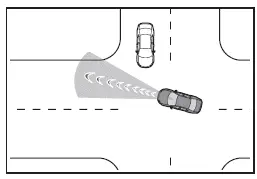
- When turning left or right in the Subaru Solterra, a pedestrian or cyclist approaching from behind may suddenly move into the vehicle’s path, appearing as if overtaking the vehicle.
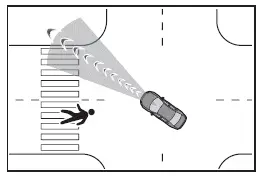
- At intersections, the Subaru Solterra may have difficulty accurately evaluating crossing vehicles with extended length, such as large trucks or vehicles towing trailers.
- In addition to the above situations, the Subaru Solterra emergency steering
assist may not function as intended under certain conditions, including:
- When a detectable object is extremely close to the vehicle, limiting reaction time
- When there is not enough space available to safely perform an evasive steering maneuver
- When obstacles are present in the intended avoidance direction
- When an oncoming vehicle restricts the available escape path
- Similarly, the Subaru Solterra Acceleration Suppression at Low Speed function
may not correctly recognize walls or obstacles in the following scenarios:
- When the background behind the wall is visible, such as through glass doors or open fences
- When the wall is angled, unusually low, or partially transparent
- When the obstacle is narrow, such as a pole or thin structure
- When the wall consists of natural elements like hedges or dense vegetation
- When reflections from the road or surroundings appear on the wall surface
- When the Subaru Solterra approaches the wall at an angle rather than head-on
Changing the pre-collision setting
- The Subaru Solterra Pre-Collision System can be enabled or disabled through the vehicle’s customization settings menu, allowing drivers to tailor system behavior to their preferences.
Each time the Subaru Solterra power switch is turned to ON, the Pre-Collision System is automatically reactivated.
- When the system is turned off, the PCS warning indicator will illuminate and a notification message will appear on the multi-information display.
- The Subaru Solterra allows adjustment of pre-collision warning timing through customization settings.
- Vehicles equipped with active steering support: Adjusting the warning timing will also influence the activation timing of emergency steering assist (excluding active steering intervention).
If the "Later" setting is selected, the Subaru Solterra emergency steering assist (excluding active steering functions) will typically not activate in most driving situations.
- In Subaru Solterra models equipped with a driver monitoring system, if the driver is not detected as facing forward, the system will automatically switch to an "Earlier" warning timing regardless of user settings.
- When dynamic radar cruise control is active, the Subaru Solterra will prioritize safety by using the "Earlier" warning timing.
- In vehicles equipped with Traffic Jam Assist, the pre-collision warning timing is also automatically set to "Earlier" during operation.
The Subaru Solterra Pre-Collision System combines adaptive intelligence with configurable settings, allowing drivers to balance comfort and responsiveness while maintaining a high level of safety across diverse driving conditions.
 Driver monitor
Basic functions
In the Subaru Solterra, the driver monitoring system continuously observes the
driver during operation using an advanced in-cabin camera. It analyzes the driver’s
head position, ...
 LTA (Lane Tracing Assist)
LTA functions
In the Subaru Solterra, when driving on roads with clearly visible lane
markings and with dynamic radar cruise control activated, the system uses a
front camera and radar senso ...
Other materials:
Engine Disassembly/Assembly [Mzr 2.3 Disi Turbo]
1. Remove the engine from the transaxle..
2. Remove the intake-air system..
3. Remove the exhaust system..
4. Remove the generator..
5. Remove the EGR valve..
6. Remove the ignition coils..
7. Remove the high pressure fuel pump and high pressure fuel pump cover..
8. Remove the fuel inj ...
Child restraint systems
Before installing a child restraint system in your Subaru Solterra,
it is essential to carefully review all safety precautions, understand the different
types of restraint systems available, and follow the correct installation procedures
outlined in this manual.
Whenever traveling with a youn ...
Jack
To remove the jack
(4–Door)
Push the tabs and remove the cover.
(5–Door)
Turn the knob and remove the cover.
Turn the wing bolt and jack screw
counterclockwise.
To secure the jack
Insert the wing bolt into the jack with
the jack screw pointing to the down
a ...
