
Subaru Solterra 2023-2026 Owner's Manual: Driver monitor
Basic functions
In the Subaru Solterra, the driver monitoring system continuously observes the driver during operation using an advanced in-cabin camera. It analyzes the driver’s head position, gaze direction, and whether the eyes are open or closed.
Based on this data, the Subaru Solterra evaluates whether the driver is actively paying attention to the road and is capable of safely performing driving actions. This intelligent system enhances overall safety by supporting driver awareness rather than replacing it.
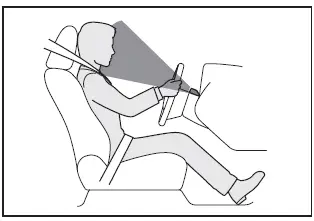
■ Warning function
In situations such as the following, the Subaru Solterra will alert the driver through a buzzer and a visual message on the display.
If the system detects that the driver is not focused on the road or if their eyes are closed, a warning will be issued.
If the Subaru Solterra cannot properly detect the driver’s face or determines that the driver’s posture is unsuitable for safe driving, a warning notification will also be triggered.
■ Face identification
The driver monitor in the Subaru Solterra includes a face identification feature designed to recognize individual drivers and apply personalized settings.
For detailed information on using face identification, prioritization among different identification methods, and how these features interact with vehicle customization, refer to the "My Settings" section.
WARNING
■ For safe use
- The Subaru Solterra driver monitor is not intended to prevent inattentive
driving or improper posture.
The driver must always remain attentive to traffic conditions and maintain full control of the vehicle to ensure safe operation.
- The system cannot eliminate fatigue or drowsiness. If you feel tired or unable to concentrate while driving the Subaru Solterra, stop in a safe location and rest before continuing.
■ Warning function
In the Subaru Solterra, certain warning features may be limited or inactive when the vehicle is traveling at very low speeds.
■ Face identification
Face recognition in the Subaru Solterra begins automatically when the driver's door is opened and then closed.
Facial characteristics are converted into digital data and securely stored within the vehicle’s internal system. This information is used exclusively for identification and personalization through My Settings.
- No images or video recordings of the driver’s face are stored in the Subaru Solterra system. Audio data is also not recorded.
- The encoded facial data is used only for identification purposes and cannot be decoded, accessed, or shared with third parties.
- The driver has full control and can delete stored facial data at any time.
- Before using face identification in the Subaru Solterra, the driver must agree to the relevant terms regarding data handling:
- Face identification does not guarantee absolute identity verification or authentication.
- If registration or recognition frequently fails, clean the camera area or re-register facial data.
- Stored facial data cannot be transferred to another device or restored once deleted, requiring re-registration.
- Once removed, face data cannot be recovered and must be registered again if needed.
■ Situations where face identification may not be performed correctly
The Subaru Solterra face recognition system relies on detecting distinct facial features. In the following situations, identification may not function accurately:
- When key facial features such as eyebrows, eyes, nose, or mouth are not clearly visible
- When the driver is wearing sunglasses, glasses, a mask, scarf, or similar items
- When the driver is not facing forward
- When parts of the face are covered by hair, beard, hands, clothing, or accessories
- When the driver’s eyes are closed
- When a non-registered individual closely resembles a registered driver (for example, twins)
Changing Driver monitor settings
The Subaru Solterra allows customization of driver monitoring features through the vehicle settings menu, enabling drivers to adjust system behavior according to personal preferences.
Proper use of the Subaru Solterra driver monitoring system contributes to improved safety awareness and a more personalized driving experience.
 SUBARU Safety Sense
The SUBARU Safety Sense suite in the Subaru Solterra integrates a
range of advanced driver assistance technologies designed to support the driver
and enhance both safety and comfort during everyda ...
 PCS (Pre-Collision System)
In the Subaru Solterra, the Pre-Collision System (PCS) utilizes advanced
sensors and monitoring technology to continuously scan the road ahead. When the
system detects a potential obstacle and det ...
Other materials:
Front Passenger Occupant Classification System
First, please read "Supplemental Restraint System (SRS) Precautions"
carefully.
Front Passenger Seat Weight Sensor
Your vehicle is equipped with a front passenger seat weight sensors as a part
of the
supplemental restraint system. These sensors are located under both of the front
p ...
Windshield Wiper Motor Inspection
1. Disconnect the negative battery cable..
2. Remove the following parts:
a. Windshield wiper arm and blade.
b. Front fender molding.
c. Cowl grille.
d. Center cowl grille No.1, No.2
3. Disconnect windshield wiper motor connector.
4. Connect the battery positive voltage to windshield w ...
PCM Configuration [Mzr 2.0, Mzr 2.5]
CAUTION:
If the wheel and tire sizes are changed, a discrepancy with the speedometer
needle whereby it exceeds the allowable range could result in a malfunction.
If the wheel and tire sizes are changed, perform the following procedure to
change the tire size parameter setting..
...
