
Mazda 3 Service Manual: Oil Pressure Switch Inspection
MZR 2.0, MZR 2.5, MZR 2.3 DISI Turbo
WARNING:
-
A hot engine can cause severe burns. Turn off the engine and wait until it is cool before removing the exhaust system.
1. Disconnect the negative battery cable..
2. Remove the aerodynamic under cover No.2..
3. Remove the oil pressure switch..
4. Apply air pressure of approx. 40 kPa {0.41 kgf/cm2, 5.8 psi} to the oil pressure switch as shown in the figure.
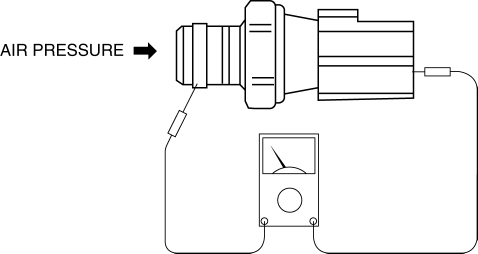
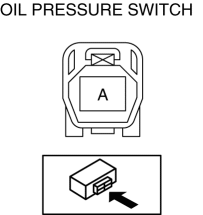
5. Measure continuity between oil pressure switch terminal A and the thread area.
-
If there is any malfunction, replace the oil pressure switch.
|
Measurement condition |
Continuity |
|
Air pressure applied |
No |
|
Air pressure not applied |
Yes |
SKYACTIV-G 2.0
WARNING:
-
A hot engine can cause severe burns. Turn off the engine and wait until it is cool before removing the exhaust system.
1. Disconnect the negative battery cable..
2. Remove the aerodynamic under cover No.2..
3. Remove the oil pressure switch..
4. Apply air pressure of approx. 120 kPa {1.22 kgf/cm2, 17.4 psi} to the oil pressure switch as shown in the figure.
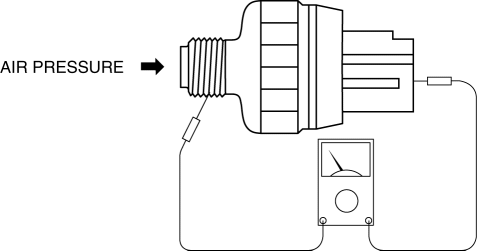
5. Measure continuity between oil pressure switch terminal A and the thread area.
-
If there is any malfunction, replace the oil pressure switch.
|
Measurement condition |
Continuity |
|
Air pressure applied |
No |
|
Air pressure not applied |
Yes |
 Transaxle Oil Replacement [G66 M R]
1. Park the vehicle on level ground.
2. Remove the aerodynamic under cover No.2..
3. Remove the drain plug and washer.
4. Drain the oil into a suitable container.
5. Install a new washer a ...
 Oil Pressure Switch Inspection [FS5 A EL]
CAUTION:
Water or foreign objects entering the connector can cause a poor connection
or corrosion. Be sure not to drop water or foreign objects on the connector
when disconnecting it.
...
Other materials:
Power Brake Unit Removal/Installation [Mzr 2.3 Disi Turbo]
CAUTION:
Once the brake switch clearance has automatically been adjusted, it cannot
be adjusted again. Therefore, replace the switch with a new one when replacing
the power brake unit or performing any procedure that changes the pedal stroke.
Secure the steering wheel using tap ...
Oil Control Valve (OCV) Removal/Installation [Mzr 2.3 Disi Turbo]
1. Remove the battery cover..
2. Disconnect the negative battery cable..
3. Remove the charge air cooler..
4. Remove the ignition coils..
5. Disconnect the ventilation hose from the cylinder head cover..
6. Remove the cylinder head cover..
7. Remove in the order indicated in the table.
...
Auxiliary Jack/Usb Port
NOTE:
“iPod” is a registered trademark of Apple Inc. in the United States and other
countries.
Purpose, Function
The Auxiliary jack/USB port outputs the audio signals of commercially-available
portable audio, a USB device, or an iPod connected to the Auxiliary jack/USB ...
