
Mazda 3 Service Manual: Oil Seal (Differential) Replacement [A26 M R]
1. On level ground, jack up the vehicle and support it evenly on safety stands.
2. Drain the oil from the transaxle..
3. Remove the front tires..
4. Remove the splash shield..
5. Remove the aerodynamic under cover No.2..
6. Separate the drive shaft and joint shaft from the transaxle..
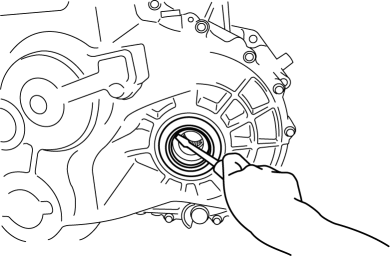
7. Remove the oil seals using a screwdriver.
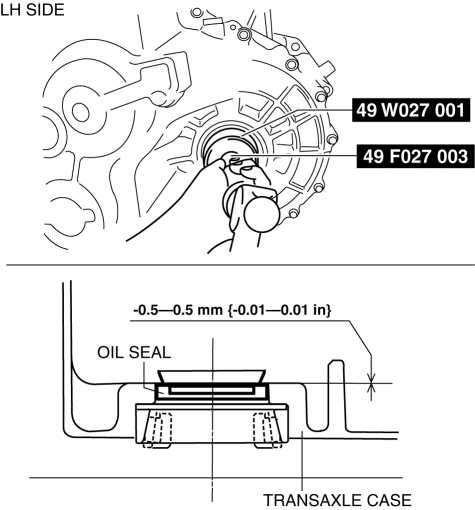
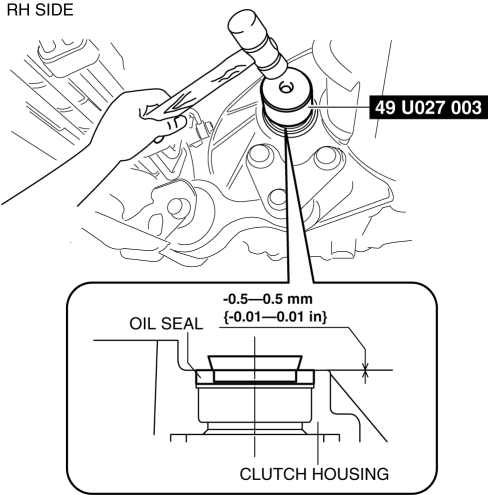
8. Using the SSTs
and a hammer, tap each new oil seal in evenly until the SSTs
contact the transaxle case.
9. Coat the lip of each oil seal with transaxle oil.
10. Insert the drive shaft and joint shaft to the transaxle..
11. Install the aerodynamic under cover No.2..
12. Install the splash shield..
13. Install the front tires..
14. Add the specified amount and type of oil..
 Differentials
...
 Oil Seal (Differential) Replacement [C66 M R]
1. Remove the aerodynamic under cover No.2 and the splash shield as a single
unit..
2. Drain the manual transaxle oil..
3. Disconnect the drive shaft (LH) from the MTX..
4. Disconnect the driv ...
Other materials:
Locking Lug Nuts
If your vehicle has Mazda optional
antitheft wheel lug nuts, one on each
wheel will lock the tires and you must
use a special key to unlock them. This
key will attach to the lug wrench.
Register them with the lock manufacturer
by filling out the card provided in the
glove compartment and ma ...
Passenger Side Air Bag Module Removal/Installation [Two Step Deployment Control
System]
WARNING:
Handling the air bag module improperly can accidentally deploy the air bag
module, which may seriously injure you. Read the air bag system service warnings
and cautions before handling the air bag module..
Due to the adoption of 2-step deployment control in the passeng ...
Dashboard Disassembly/Assembly
1. Remove the ventilator grilles..
2. Remove the Passenger-side air bag module..
3. Disassemble in the order indicated in the table.
4. Assemble in the reverse order of disassembly.
1
Wiring harness
2
Screw
3
...
