
Subaru Solterra 2023-2026 Owner's Manual: Parking Support Brake function (moving vehicles rear of the vehicle)
In the Subaru Solterra, the Parking Support Brake system utilizes rear radar sensors to continuously monitor traffic approaching from either side behind the vehicle. When a moving vehicle is detected and the system determines that the likelihood of a collision is significant, automatic brake control is applied to help reduce impact risk and enhance overall safety during reversing maneuvers.
Examples of the function operation
This advanced Subaru Solterra feature activates in practical driving situations when a moving vehicle is detected behind the vehicle’s path.
■ When reversing and a vehicle approaches while braking is insufficient or delayed
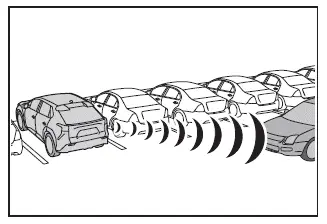
■ The Parking Support Brake function (moving vehicles rear of the vehicle) will operate when
The system engages when the Subaru Solterra driving assist indicator is off and all of the following conditions are satisfied:
- EV system output restriction control
- The Parking Support Brake system is enabled.
- The Subaru Solterra is moving at approximately 9 mph (15 km/h) or less.
- A vehicle is approaching from the left or right rear at approximately 5 mph (8 km/h) or higher.
- The shift position is set to R.
- The system determines that stronger-than-normal braking is required to prevent a collision.
- Brake control
- EV output restriction is already active.
- The Subaru Solterra determines that emergency braking is necessary to avoid impact with a rear-approaching vehicle.
■ The Parking Support Brake function (moving vehicles rear of the vehicle) will stop operating when
The Subaru Solterra system will deactivate under the following conditions:
- EV system output restriction control
- The Parking Support Brake system is turned OFF.
- The system determines that normal braking is sufficient to avoid a collision.
- No vehicles are detected approaching from the rear sides.
- Brake control
- The system is disabled.
- Approximately 2 seconds have passed since the Subaru Solterra was brought to a stop.
- The driver presses the brake pedal after the vehicle stops.
 Parking Support Brake function (static objects front and rear of the vehicle/static
objects around the vehicle)
Parking Support Brake function (static objects front and rear of the vehicle/static
objects around the vehicle)
Within the Subaru Solterra, the Parking Support Brake system continuously
monitors the driving path for stationary obstacles such as walls or fixed structures.
If the sensors detect a static objec ...
 Parking Support Brake function (pedestrians rear of the vehicle)
The Subaru Solterra is equipped with a rear camera-based detection
system capable of identifying pedestrians behind the vehicle while reversing. When
a pedestrian is detected and the system determ ...
Other materials:
Front Shock Absorber And Coil Spring Removal/Installation
CAUTION:
Performing the following procedures without first removing the ABS wheel-speed
sensor may possibly cause an open circuit in the wiring harness if it is pulled
by mistake. Before performing the following procedures, disconnect the ABS wheel-speed
sensor wiring harness connec ...
Rear Bumper Disassembly/Assembly
1. Remove the License plate lights..
2. Disassemble in the order indicated in the table.
1
Fastener A
2
Bracket
3
Screw B
4
Reflector
(See Reflector Removal Note)
5 ...
Front Bumper Disassembly/Assembly
Standard Type
Except SKYACTIV-G 2.0
1. Disassemble in the order indicated in the table.
1
Screw A
2
Guard cover
3
Screw B
4
Fastener C
5
Intake air guide
...
