
Mazda 3 Service Manual: Rear Door Glass Removal/Installation
1. Fully lower the rear door glass.
2. Disconnect the negative battery cable..
3. Remove the rear door trim..
4. Remove the rear door speaker..
5. Remove the rear power window motor..
6. Remove the service hole cover.
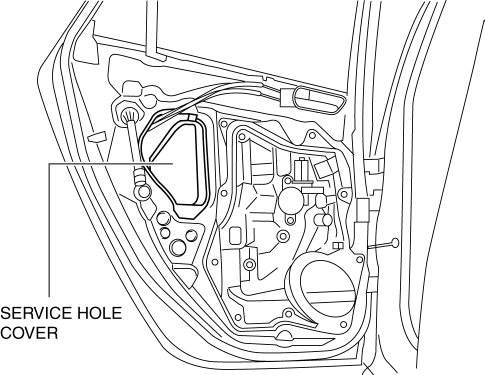
7. Remove the rear door glass guide..
8. Remove the rear door quarter glass..
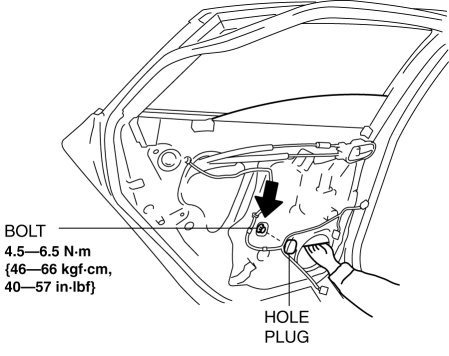
9. Remove the hole plug and bolt.
CAUTION:
-
If the bolts are removed without supporting the rear door glass, the rear door glass may fall off and be damaged. Remove the bolts while inserting your hand into the rear door speaker installation hole to support the rear door glass.
10. Lift the rear door glass up and remove while tilting it.
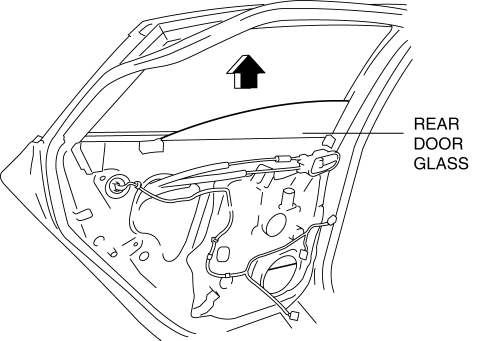
11. Install in the reverse order of removal.
CAUTION:
-
If the bolts are installed without supporting the rear door glass, the rear door glass may fall off and be damaged. When installing the rear door glass, align the glass edge with the rear door glass guide by hand through the speaker installation hole, and then install the bolts.
 Quarter Window Glass Removal
1. Remove the following parts:
a. Rear seat cushion.
b. Rear scuff plate.
c. Tire house trim.
d. Trunk side upper trim.
e. C-pillar trim.
2. Apply protective tape along the edge of the bod ...
 Rear Door Quarter Glass Removal/Installation
1. Fully lower the rear door glass.
2. Disconnect the negative battery cable..
3. Remove the rear door trim..
4. Remove the service hole cover.
5. Remove the hole plug.
6. Remove the ...
Other materials:
Ignition Switch
Push Button Start Positions
The system operates only when the key is
within operational range.
Each time the push button start is pressed,
the ignition switches in the order of off,
ACC, and ON. Pressing the push button
start again from ON switches the ignition
off.
NOTE
The engine ...
Front Side Marker/Front Turn Light Bulb Removal/Installation
1. Disconnect the negative battery cable..
2. Slightly bend back the front mudguard..
3. Rotate the front side marker/front turn light socket in the direction of the
arrow shown in the figure.
4. Remove the front side marker/front turn light bulb.
5. Install in the reverse order of ...
Drive Belt Removal/Installation [Mzr 2.0, Mzr 2.5]
MZR 2.0
A/C drive belt removal
1. Remove the aerodynamic under cover No.2 and splash shield as a single unit..
2. Remove the nut shown in the figure and set the power steering pipe component
out of the way.
3. Set the SST as shown in the figure.
NOTE:
Hold the SST by hand unti ...
