
Mazda 3 Service Manual: Refrigerant Pressure Sensor Inspection [Full Auto Air Conditioner]
MZR 2.3 DISI Turbo, MZR 2.5
1. Install the manifold gauge.
2. Verify the high-pressure side reading of the manifold gauge.
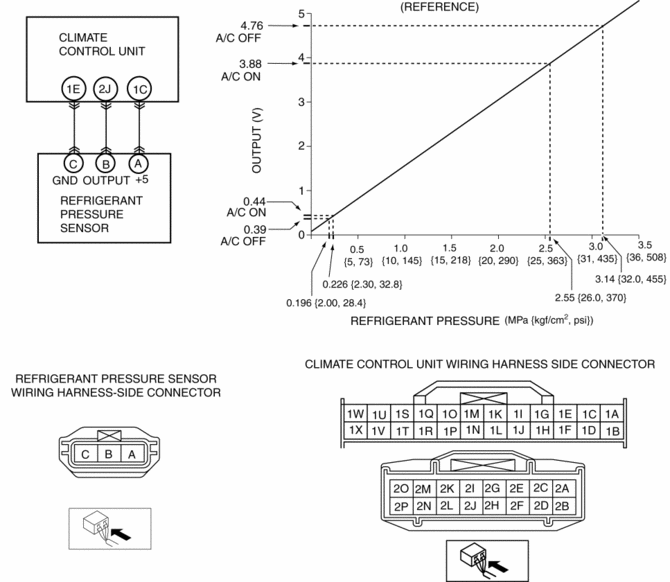
3. Measure the terminal voltage of the climate control unit.
-
1C, 1E and 2J
4. Verify that below graph as measure the terminal voltage 2J.
5. Follow the climate control unit inspection when measure the other terminal voltage..
-
Terminal 1E: 1.0 V or less
-
Terminal 1C: Approx. 5 V (Ignition switch on)
-
If the each voltage is not normal, inspect the related wiring harness.
-
If there is any malfunction, replace the related wiring harness.
-
If wiring harness is normal, replace the refrigerant pressure sensor.
SKYACTIV-G 2.0
1. Install the manifold gauge.
2. Verify the high-pressure side reading of the manifold gauge.
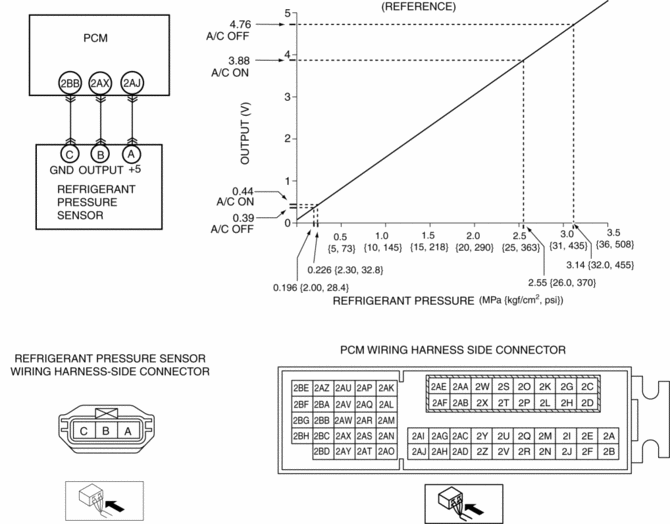
3. Measure the terminal voltage of the PCM.
-
2BB, 2AX and 2AJ
4. Verify that below graph as measure the terminal voltage 2AX.
5. Follow the PCM inspection when measure the other terminal voltage..
-
Terminal 2BB: 1.0 V or less
-
Terminal 2AJ: Approx. 5 V (Ignition switch on)
-
If the each voltage is not normal, inspect the related wiring harness.
-
If there is any malfunction, replace the related wiring harness.
-
If wiring harness is normal, replace the refrigerant pressure sensor.
 Pressure Sensor Removal/Installation [Two Step Deployment Control System]
1. Switch the ignition to off.
2. Disconnect the negative battery cable and wait for 1 min or more..
3. Remove the inner garnish..
4. Remove the front door trim..
5. Remove the bolts.
6 ...
 Refrigerant Pressure Sensor Inspection [Manual Air Conditioner]
MZR 2.0, MZR 2.5
1. Install the manifold gauge.
2. Verify the high-pressure side reading of the manifold gauge.
3. Measure the terminal voltage of the climate control unit.
1G,1H and 2J
...
Other materials:
Filament Inspection
1. Turn the ignition switch to the ON position.
2. Turn the rear window defroster switch on.
CAUTION:
Directly touching the rear window defroster filament with the lead of the
tester could damage it. Wrap aluminum foil around the end of the lead and inspect
the filament by touc ...
Front Tilt Motor Inspection
1. Remove the battery cover..
2. Disconnect the negative battery cable and wait 1 min or more..
3. Disconnect the front tilt motor connector.
4. Apply battery positive voltage to the front tilt motor terminals and inspect
the front tilt motor operation
If not as specified, replac ...
Global Positioning System (Gps) Antenna Removal/Installation
With Audio Unit (Without Display)
1. Disconnect the negative battery cable..
2. Remove the following parts:
a. Upper column cover.
b. Instrument cluster.
3. Remove in the order indicated in the table.
1
Connector
2
Screw
...
