
Mazda 3 Service Manual: Variable Valve Timing Actuator Inspection [Mzr 2.3 Disi Turbo]
CAUTION:
-
Variable valve timing actuator cannot be disassembled because it is a precision unit.
1. Remove the battery cover..
2. Disconnect the negative battery cable..
3. Remove the charge air cooler..
4. Remove the ignition coils..
5. Disconnect the ventilation hose from the cylinder head cover..
6. Remove the cylinder head cover..
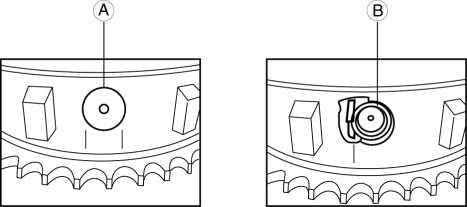
7. Inspect the variable valve timing actuator for damage around the stopper pin cap (A), or a missing stopper pin cap (B), spring and stopper.
-
If no parts are damaged or missing, go to the next step.
-
If any parts are damaged or missing, replace the variable valve timing actuator..
CAUTION:
-
If any parts are damaged or missing, remove the front cover to inspect the timing and oil pump chains and all related components for damage as a result of lost parts. Replace components if necessary.
-
If the lost parts cannot be located in the timing chain area, it will be necessary to remove the oil pan to retrieve them.
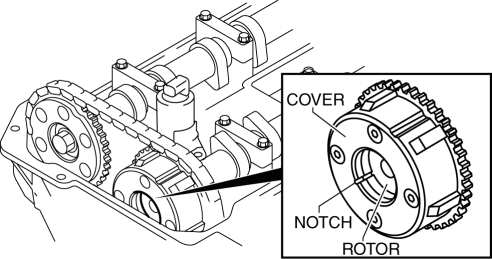
8. Turn the crankshaft clockwise so that the notches on the variable valve timing actuator can be checked.
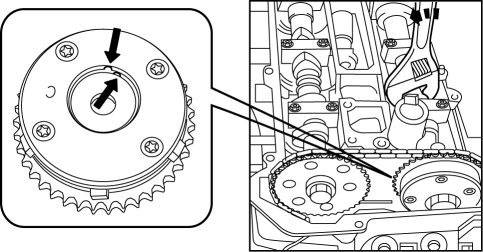
9. Turn the camshaft counterclockwise to align the notches on the variable valve timing actuator.
10. With the notches aligned, turn the camshaft clockwise 30 degrees.
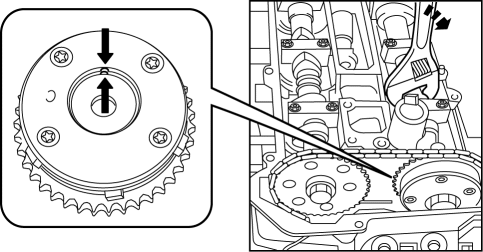
11. Verify the notches again.
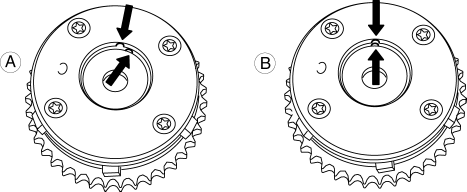
-
A: If the notches are not aligned, replace the variable valve timing actuator..
-
B: If the notches are aligned, there is no problem with the variable valve timing actuator.
NOTE:
-
In some rare cases, the timing chain tensioner ratchet lock may get stuck, which will require the removal of the engine front cover.
12. Install in the reverse order of removal.
 Variable Valve Timing Actuator Inspection [Mzr 2.0, Mzr 2.5]
CAUTION:
Variable valve timing actuator can not be disassembled because it is a precision
unit.
1. Remove the battery cover..
2. Disconnect the negative battery cable..
3. Remove ...
 Variable Valve Timing Actuator Removal/Installation [Mzr 2.0, Mzr 2.5]
NOTE:
Variable valve timing actuator can not be disassembled because it is a
precision unit.
Intake camshaft sprocket is integrated with the variable valve timing actuator
and ca ...
Other materials:
Antenna Feeder No.6 Inspection
1. Disconnect the negative battery cable..
2. Remove the following parts:
a. Upper panel.
b. Shift knob (MTX).
c. Selector lever knob (ATX).
d. Shift panel.
e. Side wall.
f. Console.
g. Car-navigation unit.
3. Verify that the continuity between antenna feeder No.6 terminals is as i ...
Mass Air Flow (MAF) Sensor Inspection [Mzr 2.0, Mzr 2.5]
Visual Inspection
1. Remove the battery cover..
2. Disconnect the negative battery cable..
3. Disconnect the MAF/IAT sensor connector.
4. Remove the MAF/IAT sensor..
5. Visually inspect the MAF/IAT sensor for the following:
Damage, cracks, soiling
Rusted sensor terminal
...
Brake Pedal Removal/Installation
CAUTION:
The clearance between the brake switch and the brake pedal is automatically
adjusted to the correct amount when the brake switch is inserted into the installation
hole on the brake pedal and rotated to fix in place. If the brake switch is
not properly installed, the clearan ...
