
Mazda 3 Service Manual: Starter Interlock Switch Removal/Installation [C66 M R]
1. Remove the battery cover..
2. Disconnect the negative battery cable..
3. Disconnect the starter interlock switch connector.
4. Remove the starter interlock switch from the pedal bracket.
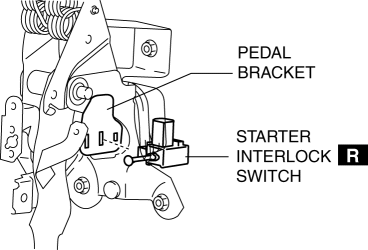
5. Insert a new starter interlock switch into the pedal bracket hole in the direction indicated by arrow A.
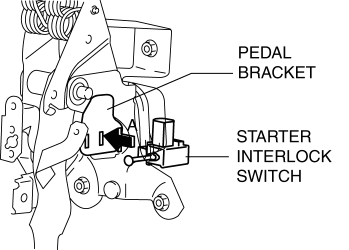
6. Slide the starter interlock switch pressing it in the direction indicated by arrow B until it is locked.
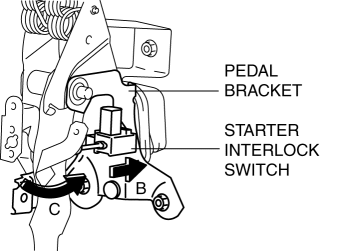
7. Fully depress the clutch pedal in the direction of arrow C, and verify that a click sound from the starter interlock switch is heard.
8. Install in the reverse order of removal.
9. Fully depress the clutch pedal, and verify that the engine starts.
 Starter Interlock Switch Inspection [Skyactiv G 2.0]
CAUTION:
Do not reuse the starter interlock switch if it is removed from the vehicle
even once. Replace with a new starter interlock switch when installing.
1. Remove the battery cove ...
 TCM Configuration [Fw6 A EL]
NOTE:
The TCM is built into the control valve body.
1. Verify TCM configuration implementation necessity for replacement parts.
Replacement part
Conf ...
Other materials:
Oil Seal Replacement [FS5 A EL]
1. Remove the aerodynamic under cover No. 2..
2. Remove the oil seal.
a. Drain the ATF..
b. Remove the drive shaft and/or joint shaft..
CAUTION:
The oil seal is easily damaged by the sharp edges of the drive shaft splines.
Do not let the splines contact the oil seal.
c. Remo ...
Battery Runs Out
Jump-starting is dangerous if done incorrectly. So follow the procedure
carefully. If you
feel unsure about jump-starting, we strongly recommend that you have a competent
service
technician do the work.
WARNING
Follow These Precautions Carefully:
To ensure safe and correct handl ...
Side Panel Removal/Installation
1. Insert a tape-wrapped fastener remover into the position indicated by the
arrow in the figure.
2. Pull the side panel in the direction of the arrow shown in the figure, then
remove the clips and hook.
3. Pull the side panel in the direction of the arrow shown in the figure, while
de ...
